Whispercode vs Talon Voice: Voice coding tools compared
Compare Whispercode and Talon Voice for voice-based coding. Learn which tool fits your workflow: prompt-based AI coding or full voice control.
Disclosure: We make Whispercode. We've tried to be fair and accurate in this comparison.
TL;DR
Whispercode and Talon Voice serve different purposes. Whispercode converts natural speech into AI prompts for Claude/ChatGPT/Copilot. Talon provides full hands-free computer control with command syntax. Choose Whispercode for quick AI prompting. Choose Talon for complete keyboard-free operation.
Quick comparison
| Feature | Whispercode | Talon Voice |
|---|---|---|
| Best for | AI prompting | Full hands-free control |
| Pricing | Subscription | Free (Patreon beta optional) |
| Key strength | Natural speech + AI formatting | Complete hands-free operation |
| Key weakness | Limited to prompts/notes | Steep learning curve |
| Setup time | 5 minutes | Hours to days |
Key takeaways
- Whispercode wins for AI prompting — Natural speech converted to structured prompts, no commands to learn, 5-minute setup
- Talon wins for hands-free computing — Complete keyboard/mouse replacement with eye tracking support, essential for RSI sufferers
- Key difference — Whispercode is a prompt tool that uses speech; Talon is a speech interface for your entire computer
- Learning curve — Whispercode works immediately with natural speech; Talon requires learning command vocabulary over days/weeks
- Price comparison — Whispercode is subscription-based; Talon is free (with Patreon beta access for advanced features)
- Our recommendation — Developers who primarily need AI prompting should use Whispercode; those needing full hands-free operation (RSI, accessibility) should invest in Talon
 Two approaches to voice-based coding: natural speech prompting vs command-based control
What is Talon Voice?
Talon Voice is a comprehensive hands-free computing platform. It enables complete keyboard and mouse replacement through speech, noise recognition, and eye tracking.
Key features:
- Speech recognition using Wav2Letter Conformer
- Eye tracking support for cursor control
- Noise recognition (pop/hiss commands)
- Fully scriptable with Python (talon files)
- Cross-platform: macOS, Linux, Windows
- Dragon dictation compatible
- Active community with shared scripts
Who uses it: Developers with RSI or mobility limitations, accessibility users, and those who want to reduce keyboard strain. The community at talonhub shares scripts and configurations.
Talon excels at providing complete hands-free operation. If you cannot use a keyboard—or strongly prefer not to—Talon is often the only viable option.
What is Whispercode?
Whispercode is a voice-to-text platform designed for developers who use AI assistants. It transforms natural speech into structured prompts for Claude, ChatGPT, and GitHub Copilot.
Key features:
- Natural speech input (no commands to learn)
- AI-powered formatting into structured prompts
- Developer dictionary with 10,000+ technical terms
- VSCode/Cursor/Windsurf integration
- Automatic file and code context
- Dual mode: Prompt Mode + Note Mode
- iOS companion app
Who uses it: Developers who prompt AI assistants multiple times daily and want to maintain flow state. The primary use case is quick capture of coding ideas and questions without leaving the IDE.
How does the approach differ?
This is the fundamental distinction between these tools.
Talon: Command-based voice control
Talon replaces your keyboard and mouse with voice commands. You learn a syntax:
"word camel case my variable name" → myVariableName
"go line twenty three" → cursor moves to line 23
"select until end" → selects from cursor to line end
"snake case get user data" → get_user_data
Commands combine to perform complex operations:
- "go line fifty, select word, delete" → navigate, select, remove
- "select block, copy, go line hundred, paste" → copy/paste a block
This approach provides complete control but requires learning the command vocabulary. Initial productivity is often 50% of keyboard speed, improving over weeks of practice.
Whispercode: Natural speech prompting
Whispercode uses AI to interpret natural speech:
"I'm working on the payment form and the submit button
isn't disabled during loading. Can you suggest how to
add a loading state that prevents double submission?"
No commands to learn. Speak as you would to a colleague. The AI formats your speech into a structured prompt with context, problem, and request sections.
This approach works immediately but is limited to prompts and notes—not general computer control.
How does learning curve compare?
Talon learning curve
Talon requires significant investment:
Week 1: Basic commands, navigation, simple editing. Expect 30-50% of normal speed. Frequent reference to command lists.
Week 2-4: Building muscle memory. Commands become automatic. Speed improves to 60-70% of typing.
Month 2+: Fluency develops. Custom commands for personal workflow. May exceed typing speed for some tasks.
The community provides excellent resources:
- Talon docs
- Community scripts
- Discord for help and tips
The investment is worthwhile if you need hands-free operation. It's substantial if you only want quick AI prompting.
Whispercode learning curve
Whispercode works immediately with natural speech:
Day 1: Install, configure hotkey, speak your first prompt. Works at full capability.
Day 2-5: Build habit of pressing hotkey instead of switching apps. Minor adjustments to speech patterns.
Week 2+: Voice prompting feels natural. Muscle memory established.
There's no command syntax to learn. If you can describe your coding problem to a colleague, you can use Whispercode.
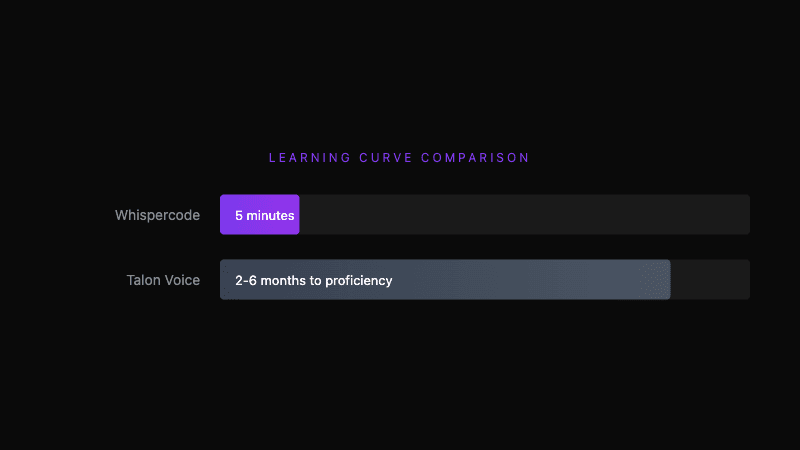 Time to productivity: immediate natural speech vs gradual command mastery
How does technical accuracy compare?
Talon's technical accuracy
Talon's speech recognition handles technical terms well due to:
- Specialized speech model training
- Custom vocabulary configuration
- Community-maintained word lists
- Context from coding environment
Commands like "word camel case react use state hook" produce reactUseStateHook correctly. The command structure itself disambiguates technical terms.
Whispercode's technical accuracy
Whispercode uses a developer dictionary built on OpenAI's Whisper model:
| You say | Whispercode hears |
|---|---|
useState | useState |
GraphQL | GraphQL |
async/await | async/await |
kubectl apply | kubectl apply |
Technical terminology accuracy reaches 98% with the specialized dictionary, compared to 60-70% with general speech-to-text.
How does IDE integration compare?
Talon IDE integration
Talon integrates through scripting. The community provides extensive VSCode scripts:
# Example talon command
"go definition": key("f12")
"references": key("shift-f12")
"format document": key("shift-alt-f")
You can control any VSCode function through voice commands. Navigation, editing, terminal, extensions—all accessible.
However, Talon doesn't automatically capture IDE context. To include file content in a prompt, you'd manually copy and paste using voice commands.
Whispercode IDE integration
Whispercode's IDE extension provides automatic context capture:
- Current file path and contents
- Selected code (if any)
- Cursor position
- Git branch information
When you speak a prompt, this context is included automatically. The AI assistant receives everything needed without manual assembly.
The extension also displays the formatted prompt directly in your editor, maintaining visual focus.
How does pricing compare?
Talon pricing
| Tier | Price | Access |
|---|---|---|
| Public | Free | Core functionality |
| Patreon Beta | $15/month | Latest features, priority support |
Talon is free for most users. The Patreon tier provides beta access to cutting-edge features and supports continued development.
Whispercode pricing
Whispercode offers subscription plans focused on unlimited usage. See current pricing for details.
Pricing verdict: Talon's free tier is compelling if you're willing to invest learning time. Whispercode's subscription makes sense for developers who want immediate productivity without the learning curve.
What does Talon do better?
We believe in honest comparisons. Here's where Talon excels:
-
Complete hands-free operation — Navigate, edit, browse, email—all without keyboard or mouse. Essential for accessibility needs.
-
Eye tracking support — Combine speech with eye tracking for cursor positioning. Unmatched for those who cannot use a mouse.
-
Unlimited customization — Python scripting enables any workflow. Create commands specific to your needs.
-
Free pricing — Core functionality costs nothing. Community support is excellent.
-
Cross-platform — Works on macOS, Linux, and Windows. Whispercode is currently macOS/iOS only.
-
Community ecosystem — Years of community scripts, tutorials, and configurations. Battle-tested by thousands of users.
What does Whispercode do better?
-
Immediate productivity — No commands to learn. Speak naturally, get results immediately.
-
AI-ready formatting — Structured prompt output with context, problem, and request sections. No manual formatting.
-
Automatic IDE context — File path, selected code, cursor position included automatically. Talon requires manual copy operations.
-
Developer dictionary — 10,000+ technical terms recognized out of the box. No custom vocabulary configuration.
-
Lower cognitive load — Natural speech uses your existing language ability. Command syntax requires learning a new language.
-
Prompt-specific optimization — Built specifically for AI prompting workflow, not adapted from general voice control.
Who should use Talon?
Talon is the better choice if you:
- Cannot use keyboard/mouse (RSI, mobility limitation)
- Want complete hands-free computer control
- Are willing to invest weeks in learning command syntax
- Need eye tracking for cursor control
- Want unlimited customization through scripting
- Prefer a one-time learning investment over ongoing subscription
Who should use Whispercode?
Whispercode is the better choice if you:
- Use AI assistants (Claude, ChatGPT, Copilot) multiple times daily
- Want immediate productivity without learning curve
- Value automatic IDE context in prompts
- Need accurate technical terminology without configuration
- Prefer natural speech over command syntax
- Don't need full hands-free computer control
Can you use both?
Absolutely. Many developers use complementary tools:
- Talon for navigation and editing when reducing keyboard strain
- Whispercode for quick AI prompts that benefit from automatic context
The tools serve different purposes and don't conflict. Talon users often appreciate Whispercode's AI formatting for prompts. Whispercode users sometimes add Talon for broader hands-free capability.
Switching between tools
From Talon to Whispercode
If you're a Talon user who wants quick AI prompting:
- Install Whispercode alongside Talon
- Configure a distinct hotkey (avoid Talon conflicts)
- Use Whispercode for AI prompts
- Continue Talon for navigation and editing
No conflict—different activation methods.
From Whispercode to Talon
If you want broader hands-free capability:
- Talon requires significant learning investment
- Keep Whispercode during transition
- Gradually shift tasks to Talon as you learn
- Eventually, you can do AI prompts through Talon if preferred
The transition takes weeks. Whispercode bridges the gap during learning.
The verdict
Choose Whispercode if: You're a developer who prompts AI assistants daily and wants natural speech input with automatic formatting and IDE context—without learning command syntax.
Choose Talon if: You need complete hands-free computer control, either for accessibility reasons or to eliminate keyboard strain entirely, and you're willing to invest in learning the command vocabulary.
Overall: These tools solve different problems. Talon replaces your keyboard. Whispercode enhances your AI workflow. Pick based on your primary need, or use both.
Frequently asked questions
What is Talon Voice?
Talon Voice is a comprehensive hands-free computing platform that replaces keyboard and mouse with speech, noise recognition, and eye tracking. It uses a command syntax ("word camel case my variable" → myVariable) and is fully scriptable with Python. It's free to use with an optional Patreon tier.
What is Whispercode?
Whispercode is a voice-to-text platform for developers that converts natural speech into structured AI prompts. It includes a developer dictionary with 10,000+ technical terms, IDE integration with automatic file context, and AI-powered formatting. It requires subscription and works on macOS/iOS.
Is Whispercode better than Talon?
For AI prompting, Whispercode is better because it works immediately with natural speech, provides automatic IDE context, and formats output for AI assistants. For complete hands-free computing or accessibility needs, Talon is better because it offers full keyboard/mouse replacement with scriptable customization.
What's the main difference between Whispercode and Talon?
Talon is a command-based system that replaces your keyboard and mouse entirely—you learn syntax like "word camel case" and "go line twenty." Whispercode converts natural speech into AI prompts without commands to learn. Talon offers more control; Whispercode offers immediate productivity.
Which is easier to learn: Whispercode or Talon?
Whispercode is significantly easier—it works immediately with natural speech and requires no command memorization. Talon takes weeks to months to learn effectively, though the investment enables complete hands-free operation that Whispercode doesn't provide.
Can I use Whispercode and Talon together?
Yes, many developers use both. Whispercode handles AI prompting with automatic context capture. Talon handles navigation and editing when reducing keyboard strain. Configure distinct activation methods to avoid conflicts.
Further reading
- Voice commands for developers
- AI enhancement and prompt formatting
- IDE integration with VSCode and Cursor
Ready for natural speech AI prompting? Try Whispercode — no commands to learn, just speak and get structured prompts.
Last updated: January 2026

Building Whispercode — voice-to-code for developers. Helping teams ship faster with AI automation, workflow optimization, and voice-first development tools.
Last updated: February 4, 2026