
Whispercode vs Superwhisper: Developer voice tools head-to-head
In-depth comparison of Whispercode and Superwhisper for macOS developers. Compare features, pricing, and workflows to choose the right voice tool.
Disclosure: We make Whispercode. We've tried to be fair and accurate in this comparison.
TL;DR
Whispercode is better for developers who need AI-ready prompts with IDE integration. Superwhisper is better for power users who want maximum customization and offline processing. Choose Whispercode for simplicity and prompt workflow. Choose Superwhisper for flexibility and privacy.
Quick comparison
| Feature | Whispercode | Superwhisper |
|---|---|---|
| Best for | AI prompting, IDE workflow | Customizable dictation |
| Pricing | Subscription | $8.49/mo or $249.99 lifetime |
| Key strength | AI formatting + IDE context | 100% offline + customization |
| Key weakness | Requires subscription | Complex setup, no AI formatting |
| Setup time | 5 minutes | 30+ minutes for custom modes |
Key takeaways
- Whispercode wins for AI prompting — Built-in prompt formatting, automatic IDE context, and structured output ready for Claude/ChatGPT without editing
- Superwhisper wins for customization — Custom modes, model selection, app-specific settings, and 100% offline operation appeal to power users
- Key difference — Whispercode focuses on prompt workflow; Superwhisper focuses on configurable dictation
- Price comparison — Whispercode is subscription-based; Superwhisper offers both subscription ($8.49/mo) and lifetime ($249.99) options
- Privacy focus — Superwhisper processes everything locally with no cloud dependency; Whispercode uses cloud processing for AI enhancement
- Our recommendation — Developers who prompt AI daily should use Whispercode for its focused workflow; those who need extensive customization or strict offline operation should choose Superwhisper
 Comparing developer voice tools: prompt-focused vs customization-focused
What is Superwhisper?
Superwhisper is a highly customizable voice-to-text application for macOS. It uses Whisper models for transcription and offers extensive configuration options.
Key features:
- Model selection (Whisper Small/Medium/Large, Parakeet)
- Custom modes (different settings per application)
- Custom prompts for AI output steering
- Custom vocabulary for personal terms
- 100% offline processing
- API key support (OpenAI, Ollama)
- File transcription
Who uses it: Power users, privacy-focused developers, and those who want maximum control over their dictation setup. Superwhisper appeals to developers who enjoy configuring tools to match exact preferences.
What is Whispercode?
Whispercode is a voice-to-text platform built specifically for developers who use AI assistants. It transforms spoken input into structured prompts with automatic IDE context.
Key features:
- Developer dictionary with 10,000+ technical terms
- AI-powered formatting into structured prompts
- VSCode/Cursor/Windsurf integration
- Automatic file and code context
- Dual mode: Prompt Mode + Note Mode
- Note-to-task workflow
- iOS companion app with widgets
Who uses it: Developers who use Claude, ChatGPT, or GitHub Copilot daily and want a streamlined prompt workflow without configuration overhead.
How does customization compare?
This is where the tools diverge most significantly.
Superwhisper's customization depth
Superwhisper is built around configuration. You can customize nearly everything:
Model Selection:
- Whisper Small (fastest, least accurate)
- Whisper Medium (balanced)
- Whisper Large (most accurate, slower)
- Parakeet (alternative model)
- External API (OpenAI, Ollama)
Custom Modes: Create application-specific settings. Example:
- IDE mode: developer vocabulary, code formatting
- Email mode: professional tone, email structure
- Notes mode: casual, minimal punctuation
Custom Prompts: Steer AI post-processing with custom prompts:
"Format output as bullet points. Include technical terms in backticks."
Custom Vocabulary: Add personal terms, project names, or specialized jargon that default models miss.
This flexibility is powerful—but requires investment to configure effectively.
Whispercode's focused approach
Whispercode prioritizes workflow over customization:
One Optimized Model: Developer-tuned model with technical vocabulary built in. No model selection needed.
Two Modes:
- Prompt Mode: For AI prompts (structured output)
- Note Mode: For documentation (formatted notes)
Automatic Enhancement: AI formatting applies without custom prompts. Spoken input becomes structured output automatically.
Built-in Developer Dictionary: 10,000+ technical terms recognized without configuration.
The tradeoff: less flexibility, but works immediately without setup.
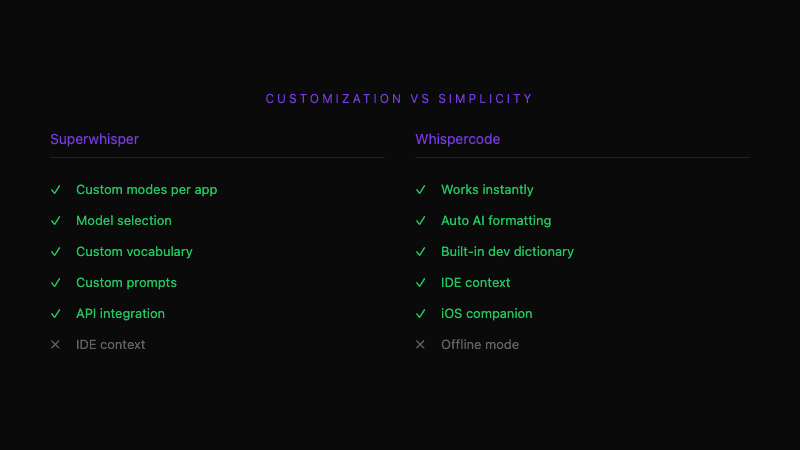 Superwhisper's extensive options vs Whispercode's streamlined workflow
How does IDE integration compare?
Superwhisper: Application-aware, not IDE-integrated
Superwhisper detects which application is active and can apply appropriate modes. But it doesn't integrate deeply with IDEs:
- No file context capture
- No selected code inclusion
- No cursor position awareness
- Outputs via standard text paste
To include code context in a prompt, you must:
- Select code manually
- Copy it
- Speak your prompt
- Edit the output to include the code
Whispercode: Native IDE integration
Whispercode's IDE extension provides deep integration:
- Current file path and contents captured automatically
- Selected code embedded in prompts
- Cursor position included for context
- Git branch information available
When you speak a prompt, the AI assistant receives:
- Your spoken description
- The file you're working in
- Any selected code
- Your position in the file
No manual copy-paste required.
How does pricing compare?
Superwhisper pricing
| Plan | Price | Details |
|---|---|---|
| Monthly | $8.49/month | Full features |
| Annual | $84.99/year | ~$7.08/month |
| Lifetime | $249.99 | One-time purchase |
| Student | 40% discount | On any plan |
The lifetime option is compelling if you expect long-term use. At ~2.5 years of monthly subscription, it pays off for committed users.
Whispercode pricing
Subscription-based pricing focused on unlimited usage. Check current pricing for specific plans.
Pricing verdict: Superwhisper's lifetime option wins for users certain about long-term commitment. Whispercode's subscription suits those who prefer flexibility or want to evaluate before committing.
How does privacy compare?
Superwhisper: 100% offline
Superwhisper processes everything locally:
- Audio never leaves your device
- Transcription runs on your Mac
- No cloud dependency
- No internet required (after initial download)
For developers handling sensitive code or working in regulated environments, this is significant.
Whispercode: Cloud processing with privacy focus
Whispercode uses cloud processing for AI enhancement:
- Audio transmitted securely for transcription
- AI formatting runs on cloud servers
- Privacy policy governs data handling
- Internet connection required
The tradeoff: better AI enhancement versus local-only processing.
What does Superwhisper do better?
Honest assessment of Superwhisper's strengths:
-
100% offline operation — Audio never leaves your device. Critical for sensitive work or air-gapped environments.
-
Extensive customization — Custom modes, models, vocabularies, and prompts. Adapt precisely to your workflow.
-
Lifetime pricing — One-time $249.99 payment eliminates ongoing costs. Pays off in ~2.5 years versus monthly subscription.
-
Model selection — Choose speed vs accuracy tradeoffs. Small model for quick notes, Large for important dictation.
-
File transcription — Process audio files, not just live speech. Useful for transcribing recordings.
-
API integration — Connect external models (OpenAI API, Ollama). Use more powerful or custom models.
What does Whispercode do better?
-
AI-ready formatting — Spoken input becomes structured prompts with context, problem, and request sections. No manual editing.
-
Automatic IDE context — File path, selected code, cursor position included automatically. No copy-paste workflow.
-
VSCode/Cursor extension — Prompts appear directly in your editor. No application switching.
-
Zero configuration — Works immediately with sensible defaults. No mode setup or vocabulary configuration.
-
iOS companion app — Capture ideas on mobile, sync to desktop. Home screen widgets for quick recording.
-
Note-to-task pipeline — Convert voice notes into actionable tasks without re-processing.
-
Developer dictionary built-in — 10,000+ technical terms without custom vocabulary setup.
Who should use Superwhisper?
Superwhisper is the better choice if you:
- Need 100% offline processing for privacy or compliance
- Enjoy configuring tools to exact specifications
- Want the lifetime pricing option to avoid subscriptions
- Need different modes for different applications
- Already have a clipboard-based AI prompting workflow
- Want to use custom or external models
Who should use Whispercode?
Whispercode is the better choice if you:
- Prompt AI assistants (Claude, ChatGPT, Copilot) multiple times daily
- Want structured prompt output without configuration
- Value automatic IDE context in prompts
- Prefer simplicity over customization
- Need mobile capture with iOS app
- Don't require strictly offline operation
Can you use both?
Possible, but probably unnecessary. Both tools serve voice-to-text for developers—using both creates overlap.
The clearer choice: evaluate your priorities:
- Customization + offline → Superwhisper
- Prompt workflow + IDE integration → Whispercode
Pick one and build your workflow around it.
Switching between tools
From Superwhisper to Whispercode
If you've been using Superwhisper and want to try Whispercode:
- Download Whispercode and complete onboarding
- Install the IDE extension
- Configure your hotkey (avoid conflicts with existing Superwhisper bindings)
- Test with your typical prompts
No data migration needed—notes and prompts are independent.
From Whispercode to Superwhisper
If Whispercode doesn't fit and you want more customization:
- Export any notes you want to keep
- Download Superwhisper
- Set up custom modes for your workflow
- Configure vocabulary and prompts
Expect setup time of 30+ minutes to recreate equivalent workflow.
The verdict
Choose Whispercode if: You're a developer who prompts AI daily and wants automatic IDE context, structured output, and zero-configuration workflow—plus mobile capture with iOS.
Choose Superwhisper if: You're a power user who values 100% offline processing, extensive customization options, and lifetime pricing—and you're willing to invest setup time.
Overall: Both tools are well-made. The choice depends on priorities: streamlined prompt workflow (Whispercode) versus configurable privacy-focused dictation (Superwhisper).
Frequently asked questions
What is Superwhisper?
Superwhisper is a customizable voice-to-text application for macOS that processes audio locally using Whisper models. It offers model selection, custom modes per application, custom vocabularies, and 100% offline operation. It's designed for power users who want maximum control over their dictation setup.
What is Whispercode?
Whispercode is a voice-to-text platform for developers that converts speech into structured AI prompts. It features a developer dictionary, AI-powered formatting, VSCode/Cursor integration with automatic file context, and an iOS companion app. It's designed for developers who prompt AI assistants daily.
Is Whispercode better than Superwhisper?
For AI prompting with automatic IDE context and structured output, Whispercode is better. For customizable dictation with 100% offline processing and lifetime pricing, Superwhisper is better. The choice depends on whether you prioritize prompt workflow or customization flexibility.
What's the main difference between Whispercode and Superwhisper?
Whispercode focuses on AI prompt workflow: automatic formatting, IDE context, and structured output ready for Claude/ChatGPT. Superwhisper focuses on configurable dictation: custom modes, model selection, and offline processing. One optimizes for prompts; the other optimizes for flexibility.
Does Superwhisper work offline?
Yes, Superwhisper processes everything locally on your Mac with no cloud dependency. Audio never leaves your device. This is its primary advantage over cloud-based tools for privacy-conscious users or those in regulated environments.
Does Whispercode have a lifetime pricing option?
Whispercode uses subscription-based pricing. Superwhisper offers both subscription ($8.49/month) and lifetime ($249.99) options. If eliminating subscriptions is important, Superwhisper's lifetime plan may be preferable.
Which has better IDE integration?
Whispercode has significantly better IDE integration with its VSCode/Cursor extension. It captures file context, selected code, and cursor position automatically. Superwhisper detects active applications but doesn't integrate deeply with IDEs—you'd manually copy code into prompts.
Further reading
- Voice commands for developers
- AI enhancement and prompt formatting
- IDE integration with VSCode and Cursor
Ready for streamlined AI prompting? Try Whispercode — automatic IDE context and structured output without configuration.
Last updated: January 2026

Building Whispercode — voice-to-code for developers. Helping teams ship faster with AI automation, workflow optimization, and voice-first development tools.
Last updated: February 18, 2026