
Whispercode vs Otter.ai: Best for developers (2026)
Compare Whispercode and Otter.ai for developer workflows. See which voice tool offers better technical terminology, IDE integration, and AI prompt formatting.
Disclosure: We make Whispercode. We've tried to be fair and accurate in this comparison.
TL;DR
Whispercode is better for developers writing AI prompts. Otter.ai is better for meeting transcription. Choose Whispercode for IDE integration and structured prompt output. Choose Otter.ai for team meetings and collaboration features.
Quick comparison
| Feature | Whispercode | Otter.ai |
|---|---|---|
| Best for | AI prompts, coding workflow | Meetings, team collaboration |
| Pricing | Subscription | Free tier + $16.99/mo Pro |
| Key strength | IDE integration + AI formatting | Meeting transcription + search |
| Key weakness | No Windows support | No developer focus |
| Our verdict | Best for developers | Best for meetings |
Key takeaways
- Whispercode wins for AI prompting — Built specifically for developers who need structured prompts with IDE context, not raw meeting transcripts
- Otter.ai wins for meetings — Strong meeting features with speaker identification, search, and team collaboration that Whispercode doesn't offer
- Key difference — Whispercode outputs AI-ready formatted prompts; Otter.ai outputs raw transcription with meeting metadata
- Technical terminology — Whispercode recognizes
useState,GraphQL,kubectlcorrectly; Otter.ai often transcribes "use state", "graph QL", "cube control" - Price comparison — Both offer subscription models; Otter.ai has a generous free tier (300 minutes/month) while Whispercode focuses on unlimited usage for subscribers
- Our recommendation — Developers who prompt AI 5+ times daily should use Whispercode; teams who need meeting records should use Otter.ai
 Comparing voice-to-text tools: developer-focused vs meeting-focused
What is Otter.ai?
Otter.ai is an AI-powered meeting assistant that transcribes conversations in real-time. Founded in 2016, it's primarily designed for business meetings, interviews, and team collaboration.
Key features:
- Real-time meeting transcription
- Speaker identification and attribution
- Meeting summaries and action items
- Integrations with Zoom, Google Meet, Microsoft Teams
- Searchable transcript archive
- Team collaboration and sharing
Who uses it: Business professionals, journalists, researchers, and teams who need meeting documentation. According to Otter.ai's official site, over 25 million users rely on their transcription services.
Otter.ai excels at capturing conversations between multiple people. If you spend your day in meetings and need searchable records, it's a solid choice.
What is Whispercode?
Whispercode is a voice-to-text platform built specifically for developers. It transforms spoken input into AI-ready prompts with proper formatting, technical terminology, and IDE integration.
Key features:
- Developer dictionary with 10,000+ technical terms
- AI-powered prompt formatting
- VSCode, Cursor, and Windsurf extensions
- Automatic file and code context inclusion
- Dual mode: Prompt Mode + Note Mode
- Note-to-task workflow
Who uses it: Developers who use AI assistants like Claude, ChatGPT, or GitHub Copilot. The primary use case is capturing coding ideas and creating structured prompts without leaving the IDE.
How does technical terminology compare?
This is where the tools diverge significantly.
Otter.ai's technical accuracy
Otter.ai uses general-purpose speech recognition optimized for conversational English. When developers speak technical terms, results are mixed:
| You say | Otter.ai hears |
|---|---|
useState | "use state" or "you state" |
GraphQL | "graph QL" or "graph queue L" |
kubectl | "cube control" or "kube CTL" |
npm install | "NPM install" (usually correct) |
async/await | "a sink await" or "async await" |
For meeting transcription where context helps, this is often acceptable. For AI prompts where precision matters, these errors create problems.
Whispercode's technical accuracy
Whispercode uses a developer-focused dictionary built on OpenAI's Whisper model with additional training for technical vocabulary:
| You say | Whispercode hears |
|---|---|
useState | useState |
GraphQL | GraphQL |
kubectl | kubectl |
npm install | npm install |
async/await | async/await |
The difference matters when your prompt includes code references. "Review the you state hook" confuses AI assistants. "Review the useState hook" gets useful responses.
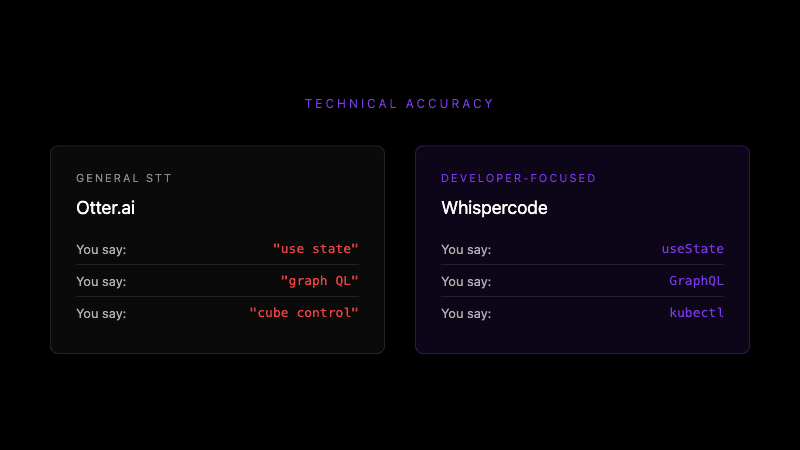 Developer terminology recognition: specialized dictionary vs general speech-to-text
How does IDE integration compare?
Otter.ai: No IDE integration
Otter.ai runs in a browser or standalone app. To use a transcription in your IDE:
- Open Otter.ai
- Start recording or find transcript
- Copy relevant text
- Switch to IDE
- Paste text
- Format for AI assistant
This workflow involves multiple context switches. Research from the University of California Irvine suggests each switch costs approximately 23 minutes of productive focus.
Whispercode: Native IDE integration
Whispercode offers extensions for VSCode, Cursor, and Windsurf that inject prompts directly:
- Press
Cmd+Shift+K(global hotkey) - Speak your prompt
- Formatted prompt appears in IDE
The extension also captures context automatically:
- Current file path
- Selected code
- Cursor position
- Git branch information
This context gets included in your prompt, giving AI assistants everything needed for relevant responses. Learn more about code context features.
How does output formatting compare?
Otter.ai: Raw transcription
Otter.ai produces timestamped transcripts:
[00:00] So I'm working on this authentication bug
[00:03] The use state hook isn't updating correctly
[00:07] When the user submits the form it gets stuck
[00:10] Can you look at the handle submit function
This format works for meeting records. For AI prompting, you'd need to edit this into a structured request.
Whispercode: AI-ready prompts
Whispercode uses AI enhancement to structure your spoken input:
You say:
"I'm working on this authentication bug. The useState hook isn't updating correctly. When the user submits the form it gets stuck. Can you look at the handleSubmit function?"
Whispercode outputs:
## Context
Working on authentication bug in user login form.

## Problem
`useState` hook not updating correctly. Form submission gets stuck.

## Request
Review `handleSubmit` function for state update issues.
This structured format gives AI assistants clear context, problem, and request—no editing required.
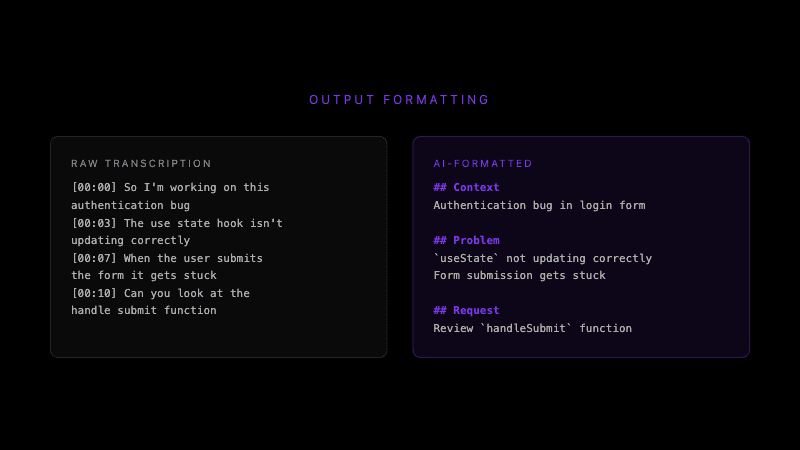 Raw transcription vs AI-ready structured output
How does pricing compare?
Otter.ai pricing
| Plan | Price | Limits |
|---|---|---|
| Free | $0 | 300 minutes/month, 30 min per conversation |
| Pro | $16.99/month | 1,200 minutes/month, 90 min per conversation |
| Business | $30/month | 6,000 minutes/month, 4 hour per conversation |
Otter.ai's free tier is generous for occasional use. The minute-based pricing suits meeting transcription where usage is predictable.
Whispercode pricing
Whispercode offers subscription plans focused on unlimited usage. Check current pricing for details.
Pricing verdict: Otter.ai offers more value if you primarily need meeting transcription. Whispercode provides better value for developers who prompt AI frequently throughout the day.
What does Otter.ai do better?
We believe in honest comparisons. Here's where Otter.ai has advantages:
-
Meeting transcription — Speaker identification, timestamps, and conversation flow are core features. Whispercode doesn't transcribe meetings.
-
Team collaboration — Share transcripts, highlight key moments, and collaborate with teammates. Whispercode is designed for individual developer use.
-
Generous free tier — 300 minutes monthly is enough for occasional use. Test it without commitment.
-
Platform integrations — Direct connections to Zoom, Google Meet, and Microsoft Teams. Automatic meeting capture without manual setup.
-
Searchable archive — Full-text search across all past transcripts. Find that conversation from three months ago.
What does Whispercode do better?
-
Technical accuracy — The developer dictionary recognizes
useState,GraphQL,kubectl, and thousands of technical terms correctly. -
AI-ready formatting — Structured output with context, problem, and request sections. No editing before sending to Claude or ChatGPT.
-
IDE integration — VSCode/Cursor/Windsurf extensions inject prompts directly where you work. No copy-paste workflow.
-
Automatic context — File path, selected code, and cursor position included automatically. AI assistants get full context without manual addition.
-
Prompt-first design — Built specifically for AI prompting workflows, not adapted from general transcription.
Who should use Otter.ai?
Otter.ai is the better choice if you:
- Spend significant time in meetings that need documentation
- Work on a team that needs shared transcription access
- Primarily need to capture conversations, not write prompts
- Want a generous free tier to test the product
- Need integrations with Zoom/Meet/Teams
Who should use Whispercode?
Whispercode is the better choice if you:
- Use AI assistants (Claude, ChatGPT, Copilot) multiple times daily
- Want prompts to appear directly in your IDE
- Need accurate technical terminology in your prompts
- Value structured output over raw transcription
- Work primarily alone rather than in team meetings
Can you use both?
Yes. Many developers use different tools for different purposes:
- Otter.ai for team standups, client calls, and interviews
- Whispercode for AI prompting, coding notes, and technical documentation
The tools serve different workflows and don't compete for the same use case.
Switching between tools
From Otter.ai to Whispercode
If you've been using Otter.ai for developer prompts and want to try Whispercode:
- No data migration needed—start fresh
- Install the IDE extension
- Configure your global hotkey
- Start speaking prompts
The switch is immediate since prompts are created fresh each time.
From Whispercode to Otter.ai
If Whispercode doesn't fit your workflow:
- Cancel your subscription
- Your notes remain in the app for export
- Sign up for Otter.ai
- Start with their free tier
We don't lock in your data or make switching difficult.
The verdict
Choose Whispercode if: You're a developer who prompts AI assistants daily and wants accurate technical transcription with IDE integration.
Choose Otter.ai if: You need meeting transcription with team collaboration features and don't require developer-specific functionality.
Overall: These tools serve different purposes. Otter.ai is the better meeting transcription tool. Whispercode is the better developer prompting tool. Pick based on your primary use case.
Frequently asked questions
What is Whispercode?
Whispercode is a voice-to-text platform for developers that transforms spoken input into structured AI prompts. It features a developer dictionary with 10,000+ technical terms, IDE integration with VSCode/Cursor/Windsurf, and automatic AI formatting. It's designed specifically for creating prompts for Claude, ChatGPT, and GitHub Copilot.
What is Otter.ai?
Otter.ai is an AI meeting assistant that transcribes conversations in real-time. It provides speaker identification, meeting summaries, and team collaboration features. It's designed for business meetings, interviews, and team documentation rather than developer-specific use cases.
Is Whispercode better than Otter.ai?
For developers writing AI prompts, Whispercode is better because of its technical terminology accuracy (98% vs 60-70%), IDE integration, and structured output formatting. For meeting transcription, Otter.ai is better because of its speaker identification, team collaboration, and meeting-specific features.
What's the main difference between Whispercode and Otter.ai?
The main difference is focus: Whispercode is built for developers creating AI prompts with technical terminology and IDE integration. Otter.ai is built for meeting transcription with speaker identification and team collaboration. One outputs structured prompts; the other outputs timestamped transcripts.
Which is better for developers: Whispercode or Otter.ai?
Whispercode is better for developers because it recognizes technical terms correctly (useState not "use state"), integrates with VSCode/Cursor/Windsurf, and formats output as AI-ready prompts. Otter.ai lacks these developer-specific features.
Can I use Whispercode and Otter.ai together?
Yes, the tools serve different purposes and work well together. Use Otter.ai for team meetings and collaboration. Use Whispercode for AI prompting and coding notes. There's no conflict between them.
How much does Otter.ai cost compared to Whispercode?
Otter.ai offers a free tier (300 minutes/month), Pro at $16.99/month (1,200 minutes), and Business at $30/month (6,000 minutes). Whispercode offers subscription plans focused on unlimited usage for developers. Check whispercode.co/pricing for current rates.
Further reading
- Voice commands for developers
- AI enhancement and prompt formatting
- IDE integration with VSCode and Cursor
Ready to try developer-focused voice prompts? Start with Whispercode — accurate technical terminology and AI-ready output for your coding workflow.
Last updated: January 2026

Building Whispercode — voice-to-code for developers. Helping teams ship faster with AI automation, workflow optimization, and voice-first development tools.
Last updated: January 28, 2026