Whispercode vs macOS Dictation: Why developers need more than built-in speech
Why macOS built-in dictation falls short for developers. Compare Whispercode's developer features against Apple's free dictation tool.
Disclosure: We make Whispercode. We've tried to be fair and accurate in this comparison.
TL;DR
macOS Dictation is free and works everywhere, but it lacks developer vocabulary, AI formatting, and IDE integration. Whispercode costs a subscription but recognizes technical terms, formats prompts for AI assistants, and injects output directly into your editor. For occasional dictation, macOS is fine. For daily AI prompting, Whispercode saves significant time.
Quick comparison
| Feature | Whispercode | macOS Dictation |
|---|---|---|
| Best for | AI prompts, developer notes | General text, casual use |
| Pricing | Subscription | Free |
| Key strength | Technical accuracy + AI formatting | Zero setup, always available |
| Key weakness | Subscription cost | No developer features |
| Technical terms | useState ✓ | "use state" ✗ |
Key takeaways
- macOS Dictation is free and universal — Built into every Mac, works in any text field, no installation required
- Technical accuracy differs dramatically — Whispercode recognizes
useState,GraphQL,kubectl; macOS produces "use state", "graph QL", "cube control" - AI formatting saves editing time — Whispercode structures spoken input into prompt format; macOS provides raw transcription needing manual cleanup
- IDE integration eliminates context switching — Whispercode injects prompts into VSCode/Cursor; macOS requires copy-paste workflow
- The cost equation depends on usage — Occasional dictation: macOS wins on price. Daily AI prompting: Whispercode's time savings exceed subscription cost
- Both tools have their place — Use macOS for quick notes and messages; use Whispercode for development workflow
 Developer-focused voice input vs built-in system dictation
What is macOS Dictation?
macOS Dictation is Apple's built-in speech-to-text feature. Press the microphone button (or use Fn twice) in any text field, speak, and text appears.
Key features:
- Built into macOS (System Preferences → Keyboard → Dictation)
- Works in any application
- Supports 50+ languages
- On-device processing available (Enhanced Dictation)
- No account or subscription required
Who uses it: Anyone who wants quick voice input without installing software. Common uses include emails, messages, documents, and casual note-taking.
macOS Dictation is genuinely useful for general text. It's free, requires no setup, and works reliably for conversational English.
What is Whispercode?
Whispercode is a voice-to-text platform built specifically for developers. It transforms spoken input into AI-ready prompts with technical vocabulary, formatting, and IDE integration.
Key features:
- Developer dictionary with 10,000+ technical terms
- AI-powered formatting into structured prompts
- VSCode/Cursor/Windsurf integration
- Global hotkeys for immediate access
- Dual mode: Prompt Mode + Note Mode
- Automatic file and code context
Who uses it: Developers who use AI assistants like Claude, ChatGPT, or GitHub Copilot throughout their workday.
How does technical accuracy compare?
This is the most significant difference between the tools.
macOS Dictation with technical terms
macOS Dictation uses general English language models. Technical vocabulary gets interpreted as common words:
| You say | macOS hears |
|---|---|
useState | "use state" or "you state" |
useEffect | "use effect" or "you effect" |
GraphQL | "graph QL" or "graphic you L" |
kubectl | "cube control" or "coob cuttle" |
async/await | "a sink await" or "asynchronous wait" |
npm install | "NPM install" (often correct) |
TypeScript | "typescript" (often correct) |
Familiar terms like "JavaScript" or "React" usually work. But API names, framework methods, and CLI commands frequently fail.
Whispercode with technical terms
Whispercode uses a developer dictionary built on OpenAI's Whisper model with specialized training:
| You say | Whispercode hears |
|---|---|
useState | useState |
useEffect | useEffect |
GraphQL | GraphQL |
kubectl | kubectl |
async/await | async/await |
npm install | npm install |
Technical accuracy reaches 98% with the specialized dictionary, compared to 60-70% with macOS Dictation on developer vocabulary.
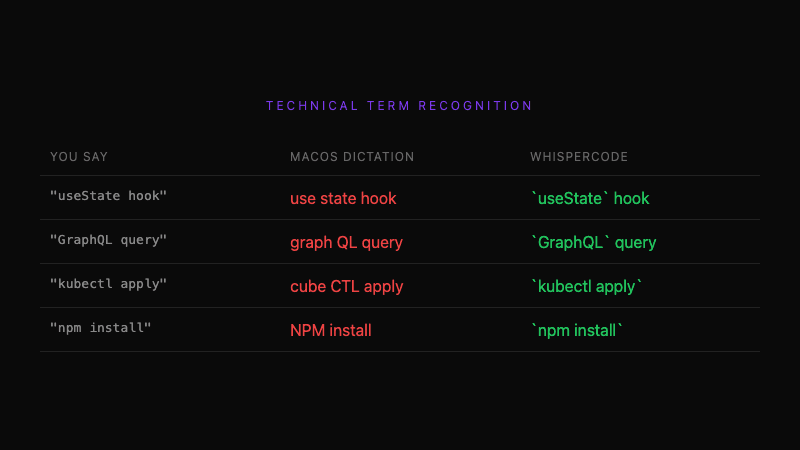 Developer terminology recognition: specialized dictionary vs general dictation
How does output formatting compare?
macOS Dictation output
macOS produces raw transcription with basic punctuation:
You say:
"I'm working on the user auth component and the login form has a bug. When the user submits with valid credentials the loading state gets stuck. The network request returns 200 but is loading never flips back to false. Can you check the use auth hook?"
macOS outputs:
I'm working on the user auth component and the login form has a bug. When the user submits with valid credentials the loading state gets stuck. The network request returns 200 but is loading never flips back to false. Can you check the use auth hook?
This text needs editing before it works as an AI prompt: fix "use auth" to useAuth, add code formatting, structure into context/problem/request.
Whispercode output
Whispercode uses AI enhancement to structure your input:
You say the same thing, Whispercode outputs:
## Context
Working on user authentication component, specifically the login form.

## Problem
Login form bug: loading state gets stuck after form submission.
- Network request returns 200 (success)
- `isLoading` state never flips back to false

## Request
Review the `useAuth` hook for the state update issue.
This formatted output is ready to send to Claude or ChatGPT. No editing required.
How does IDE integration compare?
macOS Dictation: No IDE integration
macOS Dictation works as basic text input. To use it for AI prompting:
- Enable dictation (Fn twice)
- Speak your text
- Copy the result
- Switch to browser or AI app
- Paste and format
- Send prompt
- Copy response
- Switch back to IDE
- Paste response
This workflow involves multiple application switches and manual formatting.
Whispercode: Native IDE integration
Whispercode's IDE extension provides direct injection:
- Press
Cmd+Shift+K(from any app) - Speak your prompt
- Formatted prompt appears in your IDE
The extension also captures automatic context:
- Current file path and contents
- Selected code
- Cursor position
- Git branch information
AI assistants receive complete context without manual copy-paste.
How does pricing compare?
macOS Dictation: Free
- $0, included with every Mac
- No limits on usage
- No account required
- No cloud dependency (with Enhanced Dictation)
The price is unbeatable for occasional use.
Whispercode: Subscription
Check current pricing for specific plans. The subscription provides:
- Unlimited transcription
- Developer dictionary
- AI formatting
- IDE integration
- iOS companion app
- Continuous updates
Pricing verdict: macOS Dictation wins on cost if you rarely dictate or don't need developer features. Whispercode's subscription makes sense if you prompt AI multiple times daily—the time saved on formatting and context switching exceeds the cost.
What does macOS Dictation do better?
Honest assessment—Apple's built-in option has real advantages:
-
Zero cost — Free for every Mac user. No subscription, no trial limits, no account.
-
Zero setup — Already installed. Enable in System Preferences and start using immediately.
-
Works everywhere — Any text field in any application. Whispercode focuses on IDE/prompt use cases.
-
On-device processing — Enhanced Dictation keeps audio on your Mac. Complete privacy for sensitive content.
-
Broad language support — 50+ languages with varying quality. Whispercode focuses on technical English.
-
Voice control integration — Combines with macOS Voice Control for hands-free system operation.
What does Whispercode do better?
-
Technical vocabulary — 10,000+ developer terms recognized correctly.
useStatestaysuseState. -
AI-ready formatting — Structured output with context, problem, and request sections. No manual editing.
-
IDE integration — Prompts appear directly in VSCode/Cursor. No copy-paste workflow.
-
Automatic context — File path, selected code, cursor position included automatically.
-
Prompt Mode — Designed specifically for AI prompting, not adapted from general dictation.
-
Developer workflow — Note-to-task pipeline, iOS companion app for mobile capture.
Who should use macOS Dictation?
macOS Dictation is the better choice if you:
- Need occasional dictation for general text (emails, messages)
- Don't want to pay for voice input
- Primarily dictate non-technical content
- Want system-wide availability without IDE focus
- Need extensive non-English language support
Who should use Whispercode?
Whispercode is the better choice if you:
- Prompt AI assistants (Claude, ChatGPT, Copilot) multiple times daily
- Need accurate technical terminology in your prompts
- Value structured, AI-ready output without editing
- Want prompts injected directly into your IDE
- Benefit from automatic file and code context
Can you use both?
Yes. Many developers use complementary tools:
- macOS Dictation for emails, Slack messages, and general text
- Whispercode for AI prompts and developer notes
The tools serve different purposes and don't conflict. Use the right tool for each context.
The verdict
Choose macOS Dictation if: You need free, general-purpose dictation for everyday text and don't frequently prompt AI assistants with technical content.
Choose Whispercode if: You're a developer who prompts AI daily and wants accurate technical terms, formatted output, and IDE integration—the time savings justify the subscription.
Overall: macOS Dictation is genuinely useful for what it does. It's simply not designed for developer workflows. Whispercode fills that gap with purpose-built features for AI-assisted development.
Frequently asked questions
What is macOS Dictation?
macOS Dictation is Apple's built-in speech-to-text feature available on all Macs. It works in any text field by pressing the microphone button or Fn twice. It's free, requires no installation, and supports 50+ languages with on-device processing available.
What is Whispercode?
Whispercode is a voice-to-text platform for developers that converts speech into structured AI prompts. It features a developer dictionary with 10,000+ technical terms, AI-powered formatting, and VSCode/Cursor/Windsurf integration. It requires a subscription and works on macOS and iOS.
Is Whispercode better than macOS Dictation?
For developers writing AI prompts, Whispercode is better due to technical vocabulary accuracy (98% vs 60-70%), AI formatting, and IDE integration. For general text dictation or users who don't need developer features, macOS Dictation is better because it's free and works everywhere.
Why doesn't macOS Dictation recognize technical terms?
macOS Dictation uses general English language models optimized for conversational speech. Technical terms like useState, GraphQL, and kubectl aren't in its vocabulary, so it substitutes similar-sounding common words like "use state" or "graph QL."
Can I use Whispercode and macOS Dictation together?
Yes. Many developers use macOS Dictation for emails and messages, and Whispercode for AI prompts and developer notes. The tools serve different purposes and complement each other well.
Further reading
- Voice commands for developers
- AI enhancement and prompt formatting
- IDE integration with VSCode and Cursor
Ready for developer-focused voice input? Try Whispercode — accurate technical terms and AI-ready output for your coding workflow.
Last updated: January 2026

Building Whispercode — voice-to-code for developers. Helping teams ship faster with AI automation, workflow optimization, and voice-first development tools.
Last updated: February 10, 2026