Voice-to-code: How developers use voice commands for better AI prompts
Discover how developers use voice-to-text to capture coding ideas instantly. Learn the workflow for AI-ready prompts without breaking flow.
TL;DR
Voice-to-code lets developers speak prompts instead of typing, capturing ideas 3x faster while maintaining flow state. Modern tools transcribe technical terms with 98% accuracy and format output as AI-ready prompts.
Key takeaways
- Voice input is 3x faster than typing for complex prompts — Average speaking speed is 150 WPM versus 40 WPM typing, making voice ideal for detailed AI instructions
- Context switching costs developers 23 minutes on average — Breaking flow to type a prompt means losing the mental model you spent time building
- Developer-focused transcription recognizes technical terms — Tools with specialized dictionaries transcribe
useState,GraphQL, andkubectlcorrectly instead of "use state" or "graph QL" - AI formatting eliminates prompt rewrites — Voice-to-code tools structure your spoken thoughts into markdown with code blocks, context sections, and clear instructions
- IDE integration keeps everything in one place — The prompt appears where you need it, with file context and selection automatically included
 How developers use voice commands to capture coding ideas and write AI-ready prompts without breaking flow
What is voice-to-code?
Voice-to-code is the practice of using speech input to create code-related content—primarily AI prompts, documentation, and technical notes. Unlike traditional dictation software designed for general text, voice-to-code tools are built specifically for developers.
The core workflow is simple: press a hotkey, speak your prompt naturally, and receive AI-ready output formatted for Claude, ChatGPT, or Copilot. No editing required.
This differs from voice control systems like Talon, which let you dictate actual code syntax. Voice-to-code focuses on the meta-layer: communicating with AI assistants about what you want to build.
Why are developers switching to voice input?
The shift to voice isn't about typing speed—it's about cognitive load.
The flow state problem
When you're deep in a debugging session, you've built a mental model of the problem. You understand the state, the relationships between components, the hypothesis you're testing.
Then you need Claude's help.
Traditional workflow: switch to browser, open Claude, start typing, realize you need to explain context, go back to IDE, copy code, paste it, format it, add your question. By the time you're done, your mental model has degraded.
Research from the University of California Irvine found that context switches cost an average of 23 minutes to fully recover focus. Even small interruptions compound throughout a development session.
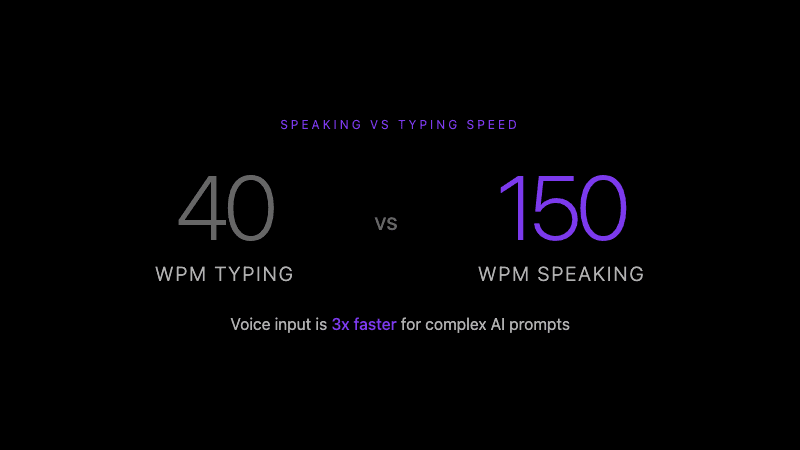 Voice input is 3x faster for complex AI prompts
Voice preserves context
With voice-to-code, the workflow becomes: press Cmd+Shift+K, describe what you need while looking at the code, receive a formatted prompt in your IDE. Your hands never leave the keyboard. Your eyes never leave the code.
The prompt captures your thought while it's fresh—including the nuances you'd forget while typing.
How does voice-to-code work?
Modern voice-to-code tools combine several technologies:
1. Speech recognition with developer vocabulary
General speech-to-text services struggle with technical terminology. When you say "useState hook," they hear "use state hook" or "you state hook."
Developer-focused tools use specialized dictionaries with 10,000+ technical terms. They recognize:
- Framework methods:
useState,useEffect,getServerSideProps - CLI commands:
kubectl,docker-compose,npm run - Technical concepts:
OAuth,JWT,GraphQL,WebSocket
Accuracy on technical terms reaches 98% with proper dictionary support, compared to 60-70% with general STT. This accuracy difference is powered by the same Whisper model from OpenAI that revolutionized speech recognition.
2. AI-powered formatting
Raw transcription isn't enough. A stream-of-consciousness explanation needs structure to work as an AI prompt.
Voice-to-code tools use AI to transform your spoken input into formatted output:
What you say:
"I'm working on the user auth component, specifically the login form. I'm getting an error when the user submits with an empty email field. Can you look at the validation logic and suggest why the error boundary isn't catching this? The relevant code is in the useLoginForm hook."
What you get:
## Context
Working on user authentication component, specifically the login form.

## Problem
Error occurs when user submits with empty email field. The error boundary isn't catching this validation error.

## Question
Review the validation logic in `useLoginForm` hook and identify why the error isn't being caught by the error boundary.

## Relevant Files
- useLoginForm hook (validation logic)
- Login form component (error boundary)
This structured format gives AI assistants the context they need to provide useful responses.
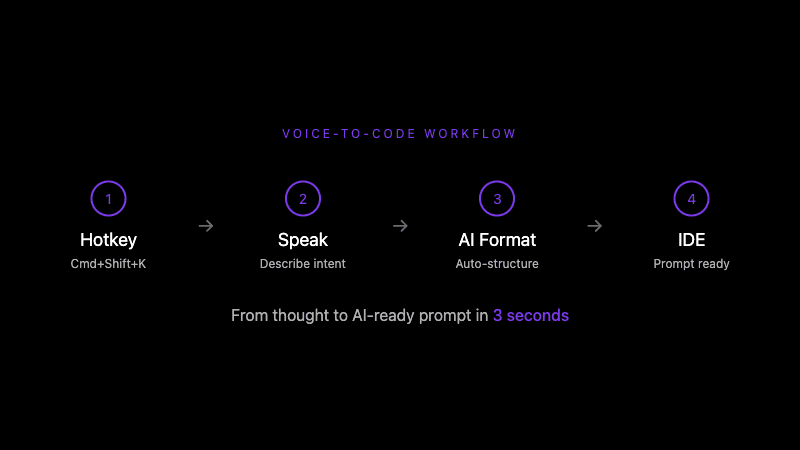 From thought to AI-ready prompt in 3 seconds
3. IDE integration
The final piece is delivery. Voice-to-code tools with IDE extensions inject prompts directly into your editor, along with automatic context:
- Current file path and contents
- Selected code (if any)
- Cursor position
- Git branch information
The AI receives everything it needs without you manually copying and pasting.
What's the difference between voice-to-code and voice control?
Two distinct approaches exist for voice-based development:
| Aspect | Voice-to-Code | Voice Control (e.g., Talon) |
|---|---|---|
| Primary use | Creating AI prompts, notes | Dictating actual code |
| Learning curve | Low (speak naturally) | High (learn command syntax) |
| Output | Formatted prompts/docs | Code characters |
| Setup time | Minutes | Hours to days |
| Best for | AI-assisted development | Accessibility, RSI prevention |
Voice control systems like Talon are powerful tools, especially for developers with RSI or mobility limitations. They enable complete hands-free coding through command syntax like "word camel case my variable name" → myVariableName.
Voice-to-code takes a different approach: natural speech processed by AI. You don't need to learn commands—just describe what you want in plain language.
Many developers use both: voice-to-code for AI prompting, Talon for hands-free editing when needed.
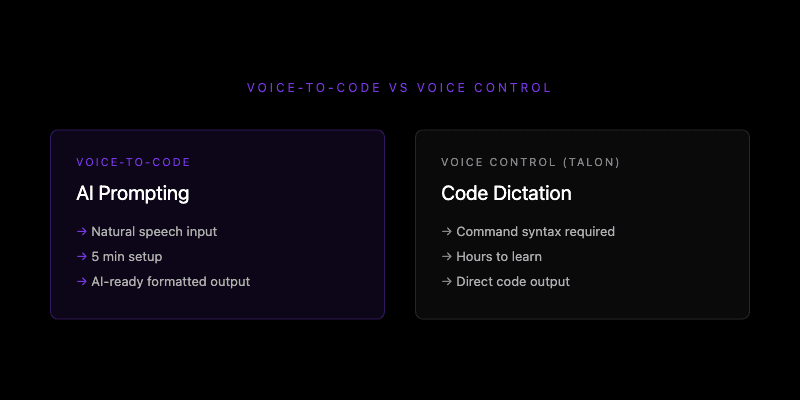 Different approaches for different needs: AI prompting vs code dictation
When should you use voice-to-code?
Voice input isn't always the right choice. Here's when it shines:
Best use cases
Complex prompts with context — When you need to explain a multi-file problem, describe architecture decisions, or ask nuanced questions. Speaking captures more detail than most developers would type.
Brainstorming and ideation — Talking through a problem often reveals solutions. Voice-to-code captures these thoughts as structured notes.
Documentation while coding — Explain what you just built while it's fresh. Voice input captures the "why" behind decisions that you'd skip if typing.
Task creation and planning — "Add a task to implement retry logic for the API calls in the payment service" becomes an actionable item without context switching.
Less ideal use cases
Quick one-line prompts — If your prompt is "fix the typo on line 23," typing is faster.
Noisy environments — Open offices and coffee shops reduce transcription accuracy.
Highly repetitive prompts — Templates and snippets work better for standardized requests.
How do you get started with voice-to-code?
The setup process takes about 5 minutes:
Step 1: Choose your tool
Several voice-to-code tools exist for developers:
- Whispercode — macOS/iOS with VSCode extension, developer dictionary, AI formatting
- macOS Dictation — Free, built-in, but no technical term support or AI formatting
- Otter.ai — Meeting transcription, not developer-focused
- Superwhisper — General voice-to-text, no IDE integration
For AI-enhanced voice commands with proper technical terminology, developer-specific tools provide the best experience.
Step 2: Configure your hotkey
Global hotkeys let you trigger recording from any application. Common choices:
Cmd+Shift+K— Prompt mode (quick AI prompts)Cmd+Shift+N— Note mode (longer documentation)
The hotkey should be easy to reach without looking, since you'll use it while focused on code.
Step 3: Practice the workflow
Start with low-stakes prompts. Ask Claude to explain a function. Request refactoring suggestions. Document a completed feature.
The goal is building muscle memory: problem → hotkey → speak → prompt ready.
Most developers report feeling natural with the workflow within a day or two of regular use.
What results can you expect?
Voice-to-code changes how you interact with AI assistants:
Before: Prompts are an interruption. You minimize them, skip context, get generic responses.
After: Prompts capture your full thought. AI receives complete context. Responses are specific and actionable.
Developers report:
- 60-70% reduction in prompt editing/rewriting
- More detailed context shared with AI
- Fewer back-and-forth clarification rounds
- Better documentation habits (because it's easier)
The compound effect matters most. Slightly better prompts, sent more frequently, with richer context—this adds up to meaningfully better AI-assisted development.
Frequently asked questions
What is voice-to-code?
Voice-to-code is using speech input to create AI prompts, technical documentation, and coding notes. Unlike voice control systems that dictate actual code syntax, voice-to-code focuses on communicating with AI assistants in natural language, then formatting that speech into structured, AI-ready output.
How does voice-to-code improve developer productivity?
Voice-to-code preserves flow state by eliminating context switches. Developers speak prompts in 3 seconds instead of spending 1-2 minutes typing, formatting, and adding context. The AI receives richer information because speaking captures nuance that developers typically skip when typing.
What's the difference between voice-to-code and Talon?
Talon is a voice control system for dictating code syntax through learned commands. Voice-to-code creates AI prompts through natural speech. Talon requires learning command grammar (hours of practice); voice-to-code works immediately with natural language. Many developers use both for different tasks.
Does voice-to-code work with technical terminology?
Developer-focused voice-to-code tools recognize technical terms with 98% accuracy using specialized dictionaries. They correctly transcribe useState, kubectl, GraphQL, and 10,000+ other technical terms. General speech-to-text services typically achieve only 60-70% accuracy on developer vocabulary.
Is voice-to-code worth it for developers in 2026?
Voice-to-code provides clear value for developers who frequently use AI assistants like Claude, ChatGPT, or Copilot. The ROI comes from preserved flow state (23 minutes per avoided context switch), richer prompts (better AI responses), and captured documentation (ideas recorded while fresh). Developers working in quiet environments who prompt AI multiple times daily see the strongest benefits.
Further reading
- Voice commands for developers
- AI enhancement and prompt formatting
- IDE integration with VSCode and Cursor
Ready to try voice-to-code? Start with Whispercode — developer-focused voice prompts with IDE integration and AI formatting.
Last updated: January 2026

Building Whispercode — voice-to-code for developers. Helping teams ship faster with AI automation, workflow optimization, and voice-first development tools.
Last updated: January 24, 2026