
Vibe coding explained: The new wave of AI-assisted development
What is vibe coding? Learn about the AI-first development approach where natural language prompts replace traditional line-by-line coding.
TL;DR
Vibe coding is an AI-first development approach where you describe what you want in natural language and AI generates the code. Instead of writing every line, you prompt, review, iterate. It's transforming how developers work in 2026—especially with tools like Cursor, Windsurf, and Claude.
Key takeaways
- Vibe coding shifts focus from syntax to intent — You describe what the code should do; AI handles implementation details like variable naming, imports, and boilerplate
- The workflow is prompt → generate → review → iterate — Developers become reviewers and architects rather than line-by-line writers
- Voice input accelerates vibe coding — Speaking prompts captures more context than typing, producing better AI-generated code on the first try
- Not all tasks suit vibe coding — Performance-critical code, security-sensitive logic, and novel algorithms still benefit from traditional development
- Quality depends on prompt quality — Vague prompts produce vague code; specific prompts with context produce production-ready output
- Tools are evolving rapidly — Cursor, Windsurf, Claude, ChatGPT, and GitHub Copilot all support vibe coding workflows with different strengths
 The new wave of prompt-driven development transforming how developers work
What is vibe coding?
Vibe coding is a development approach where natural language descriptions replace traditional line-by-line coding. Instead of writing const handleSubmit = async (e) => { e.preventDefault()..., you describe: "Create a form handler that validates input, submits to the API, and shows loading state."
The term emerged from the AI-native development community—developers who grew up with Cursor, Claude, and ChatGPT as fundamental tools rather than optional assistants. For them, prompting AI is as natural as typing code was for previous generations.
Vibe coding doesn't mean abandoning programming knowledge. It means applying that knowledge differently: understanding what good code looks like so you can prompt for it, review it effectively, and iterate toward production quality.
How does vibe coding work?
The core loop
Traditional development:
Think → Type code → Debug → Refine → Repeat
Vibe coding:
Think → Prompt AI → Review output → Iterate → Repeat
The cognitive work shifts from syntax and implementation to specification and review. You still need to understand programming—but you're directing rather than typing.
Example: Building a feature
Traditional approach:
- Plan the data structure
- Write the TypeScript interfaces
- Create the React component
- Add state management
- Implement event handlers
- Style with CSS/Tailwind
- Add error handling
- Write tests
Each step involves typing code character by character.
Vibe coding approach:
- Prompt: "Create a user profile component that displays name, email, avatar, and edit button. Use TypeScript and Tailwind. Include loading and error states."
- Review the generated component
- Prompt: "Add form validation to the edit mode—email must be valid, name required"
- Review and adjust
- Prompt: "Add unit tests for the validation logic"
- Review, merge
The mental model is the same. The implementation method differs.
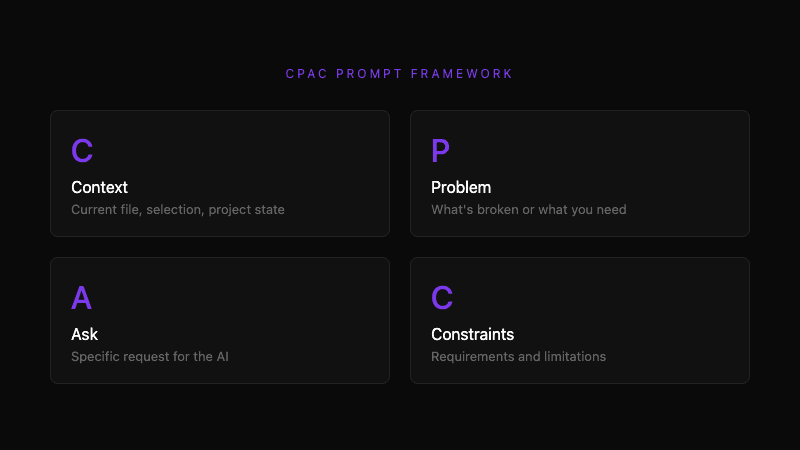 The CPAC framework: Context, Problem, Ask, Constraints
Why are developers adopting vibe coding?
Speed advantage
A developer types 40-60 WPM. AI generates code at thousands of tokens per second. For standard patterns—forms, API calls, data transformations—AI produces working code faster than typing.
Research from GitHub found that developers using Copilot completed tasks 55% faster than those coding manually. For repetitive patterns, the advantage is even larger.
Reduced boilerplate burden
Modern development involves significant boilerplate:
- Import statements
- Type definitions
- Error handling patterns
- State management setup
- API integration code
Vibe coding handles boilerplate automatically. You describe the unique part; AI fills in the standard parts.
Better first drafts
A well-prompted AI often produces better-structured code than a developer's initial attempt. AI has seen millions of implementations. It naturally applies common patterns, reasonable defaults, and established conventions.
This doesn't mean AI code is perfect. It means the starting point is often stronger, and refinement moves from "make it work" to "make it better."
Lower barrier for new codebases
Jumping into an unfamiliar codebase traditionally requires:
- Reading documentation
- Understanding patterns
- Finding examples
- Adapting to conventions
With vibe coding, you can describe what you want and let AI match the codebase's patterns. "Add a new API endpoint following the same pattern as the user endpoints" produces contextually-appropriate code.
How does voice input enhance vibe coding?
Voice input and vibe coding are natural complements.
Speaking captures more context
When typing prompts, developers minimize. Each character is effort. Prompts become terse:
"Add validation to form"
When speaking, detail flows naturally:
"I need to add validation to the payment form. The credit card number should be validated with Luhn algorithm, expiration date should be future date, and CVV should be exactly 3 digits. Show inline errors below each field and disable the submit button until all fields are valid."
The spoken prompt gives AI everything needed for a complete implementation. The typed prompt requires follow-up questions.
IDE context adds specificity
Voice-to-code tools with IDE integration capture additional context:
- Current file and its contents
- Selected code
- Related files
- Project structure
Combined with spoken description, AI receives:
- What you want (your words)
- Where you want it (file context)
- How it should fit (code context)
This combination produces significantly better results than clipboard-based prompting.
Flow state protection
Vibe coding requires frequent prompting. Each prompt is an opportunity to break flow. Voice input eliminates typing friction, letting you prompt while maintaining visual focus on the code.
Press hotkey → speak → continue working. The prompt appears without context switching.
What tools support vibe coding?
Cursor
Cursor is a fork of VS Code built around AI-first development. Key features:
- Cmd+K for inline generation
- Chat panel with codebase context
- Multi-file editing from single prompts
- Tab completion with context
Cursor is the de facto standard for vibe coding in 2026. Its context awareness and multi-file handling make complex prompts effective.
Windsurf
Windsurf (by Codeium) is another AI-first IDE:
- Cascade feature for agentic coding
- Full codebase indexing
- Inline and chat generation
- Free tier with generous limits
Windsurf's cascade feature handles multi-step tasks with less prompt engineering.
Claude (Anthropic)
Claude excels at complex, nuanced prompts:
- Strong reasoning about architecture
- Excellent at explaining and teaching
- Handles long contexts well
- Available via API, web, and integrations
Many developers use Claude for design decisions and complex implementations, then Cursor for iterative refinement.
GitHub Copilot
The original AI coding assistant:
- Deep GitHub/VSCode integration
- Strong at autocomplete
- Copilot Chat for prompting
- Copilot Workspace for larger tasks
Copilot works well embedded in existing workflows. Less transformative than dedicated tools, but widely available.
ChatGPT
OpenAI's general assistant handles code well:
- GPT-4 produces strong code
- Canvas feature for editing
- Works across any project
- Good for explaining and learning
ChatGPT lacks IDE integration but excels at standalone code generation and explanation.
When does vibe coding work best?
Ideal use cases
Standard CRUD operations — Creating endpoints, forms, and data flows that follow established patterns. AI has seen thousands of examples.
UI components — Building React/Vue/Svelte components with standard behavior. Describe the UX; AI handles implementation.
Data transformations — Converting between formats, processing collections, formatting output. Describe input and output; AI writes the transformation.
Test generation — Describing what to test and expected behavior. AI handles test setup and assertions.
Refactoring — Describing desired improvements. AI applies patterns consistently across files.
Documentation — Explaining code, generating READMEs, writing API docs. AI excels at documentation that follows existing code.
Less ideal use cases
Performance-critical code — When microseconds matter, you need to understand exactly what's happening. AI can miss optimization opportunities.
Security-sensitive logic — Authentication, encryption, authorization logic benefits from careful human review. AI can introduce subtle vulnerabilities.
Novel algorithms — When solving genuinely new problems, AI has no examples to draw from. Traditional development often wins.
Complex state machines — Intricate stateful logic can confuse AI. Clear, manual implementation may be more reliable.
Legacy code integration — Unusual patterns and missing context can produce poor AI results. Understanding the system matters.
How do you write effective vibe coding prompts?
The CPAC framework
Good prompts follow a structure:
Context: What are you working on? Problem: What needs to be built or fixed? Ask: What should AI do? Constraints: What requirements or limitations apply?
Example:
Context: I'm building a user dashboard in Next.js with TypeScript and Tailwind. Problem: Need to add a settings panel for notification preferences. Ask: Create a settings component with toggles for email, push, and SMS notifications. Constraints: Use React Hook Form for state, follow the existing card component pattern, include loading state for save operation.
This structure gives AI everything needed for a complete, contextually-appropriate implementation.
Specificity matters
Vague prompt:
"Make a login form"
Specific prompt:
"Create a login form with email and password fields. Use Formik for form state and Yup for validation. Email must be valid format. Password minimum 8 characters. Show field-level errors on blur. Disable submit during API call. Handle 401 and 500 errors with appropriate messages. Use our existing Button and Input components from @/components/ui."
The specific prompt produces production-ready code. The vague prompt produces a starting point that needs significant modification.
Iterate rather than restart
When AI output isn't right, refine rather than start over:
"The validation is good, but move the error display below each field instead of at the top of the form. Also add aria-invalid attributes for accessibility."
Each iteration builds on context. The AI understands what exists and what's changing.
What are the risks of vibe coding?
Code you don't understand
If AI generates code you can't review, you can't maintain it. Every generated line should be comprehensible.
Mitigation: Ask AI to explain code when needed. Build understanding alongside code.
Subtle bugs
AI can produce code that works in testing but fails in edge cases. Pattern-matching doesn't guarantee correctness.
Mitigation: Review thoroughly. Test edge cases explicitly. Don't trust generated code more than human code.
Security vulnerabilities
AI can introduce security issues—SQL injection, XSS, improper authentication. It matches patterns, not security requirements.
Mitigation: Security review all AI-generated code. Use static analysis tools. Treat AI code with the same scrutiny as external contributions.
Technical debt
Fast generation can mean fast accumulation of debt. Copy-paste patterns multiply issues.
Mitigation: Refactor as you go. Apply the same code quality standards regardless of origin.
What does the future of vibe coding look like?
Trends for 2026-2027
Agentic development: AI handles multi-step tasks autonomously. "Implement this feature" becomes "Build this feature, write tests, open PR."
Codebase-aware prompting: AI understands entire codebases, not just current files. Prompts reference patterns from anywhere in the project.
Real-time collaboration: AI participates in code review, suggests improvements, catches issues before merge.
Voice-native interfaces: Voice prompting becomes standard. Speaking to your IDE feels as natural as typing commands.
The evolving developer role
Vibe coding doesn't eliminate developer expertise—it redirects it. The developers who thrive understand:
- System design and architecture
- Code review and quality assessment
- Prompt engineering and iteration
- When to trust AI and when to verify manually
The job becomes more architectural and less mechanical. That's not less valuable—it's more.
Frequently asked questions
What is vibe coding?
Vibe coding is an AI-first development approach where you describe what you want in natural language and AI generates the code. Instead of typing every line, you prompt AI, review output, and iterate. The workflow shifts from implementation to specification and review.
How is vibe coding different from traditional coding?
Traditional coding: think → type code → debug → refine. Vibe coding: think → prompt AI → review output → iterate. You still need programming knowledge, but you apply it differently—directing AI rather than writing every character.
What tools do I need for vibe coding?
Primary tools include AI-first IDEs (Cursor, Windsurf) or AI assistants (Claude, ChatGPT, Copilot) integrated with your editor. For enhanced prompting, voice input tools capture richer context than typing.
Does vibe coding replace traditional programming skills?
No. Vibe coding requires understanding what good code looks like so you can prompt for it and review it effectively. Programming knowledge shifts from typing to directing and reviewing. The fundamentals—data structures, algorithms, system design—remain essential.
When should I not use vibe coding?
Avoid vibe coding for performance-critical code, security-sensitive logic, novel algorithms, and complex state machines. These areas benefit from careful human implementation where you understand every decision.
How do I write better vibe coding prompts?
Use the CPAC framework: Context (what you're working on), Problem (what needs building), Ask (what AI should do), Constraints (requirements and limitations). Specific prompts with context produce better results than vague requests.
Further reading
- Voice commands for developers
- AI enhancement and prompt formatting
- IDE integration with VSCode and Cursor
Ready to enhance your vibe coding workflow? Try Whispercode — speak your prompts, get AI-ready output with full IDE context.
Last updated: January 2026

Building Whispercode — voice-to-code for developers. Helping teams ship faster with AI automation, workflow optimization, and voice-first development tools.
Last updated: February 7, 2026