Multilingual coding: Voice input for international developers
Code in your native language. Learn how voice-to-text tools support 8+ languages with technical terminology recognition for international developers.
TL;DR
International developers can use voice input in their native language while maintaining English code terminology. Modern tools support 8+ languages with technical term recognition, so you can explain problems in Spanish, German, or Japanese while terms like useState and GraphQL remain correctly formatted in the output.
Key takeaways
- Native language prompts produce better explanations — Explaining complex logic in your most fluent language captures nuance that English-as-second-language prompts miss
- Technical terms stay in English — Even when speaking German or Japanese, terms like
useState,GraphQL, andkubectlare recognized in their English form - 8+ languages support technical vocabulary — Beyond English: Spanish, German, French, Portuguese, Japanese, Chinese, and more with developer dictionaries
- AI formatting works across languages — Spoken Spanish input becomes structured English prompts suitable for Claude or ChatGPT
- Context expression is language-dependent — The "how" and "why" are easier to express in your native language; code terms are universal
- Language switching is natural — International developers already code-switch; voice tools accommodate this pattern
 Code in your native language with technical terminology recognition
Why does language matter for voice coding?
The fluency gap
Many international developers are highly proficient in English—for code, documentation, and professional communication. But there's a difference between professional proficiency and native fluency.
When explaining a complex bug, subtle distinctions matter:
- Is the state not updating, or should it not update?
- Did the request fail, or might it fail under certain conditions?
- Could this approach work, or would it definitely work?
In your native language, these nuances are automatic. In a second language, they require conscious effort—cognitive load that competes with understanding the technical problem itself.
Prompt quality affects AI response quality
AI assistants respond to the precision of your prompts. A prompt that captures the exact problem gets targeted solutions. A prompt that approximates the problem gets generic responses.
If you can express the problem more precisely in Spanish or German, your prompts will be more precise—and Claude's responses will be more useful.
Code is already multilingual
Developers naturally code-switch. A German developer might say:
"Der
useStatehook updated nicht richtig wenn der user das form submitted."
This mixed German-English is natural for technical discussion. Voice tools that accommodate code-switching match how international developers actually think and speak.
How does multilingual voice input work?
Language detection
Modern voice-to-text tools detect language automatically. Speak German, get German transcription. Speak English, get English. Speak mixed German-English, get appropriate handling of both.
OpenAI's Whisper model, which powers many developer voice tools, supports 99 languages with varying quality levels.
Technical term handling
The key for developers: technical terms must stay technical.
| You say (German) | Correct output |
|---|---|
| "Der useState hook" | "Der useState hook" |
| "Die GraphQL query" | "Die GraphQL query" |
| "Kubectl apply ausführen" | "kubectl apply ausführen" |
Developer-focused tools with specialized dictionaries recognize English technical terms regardless of the surrounding language.
AI formatting across languages
After transcription, AI formatting restructures your input. This works across languages:
Spanish input:
"Estoy trabajando en el componente de autenticación. El useState no se actualiza correctamente después de la llamada API. El servidor devuelve 200 pero el estado de loading sigue siendo true."
Formatted output:
## Context
Working on authentication component.

## Problem
`useState` not updating correctly after API call.
- Server returns 200
- Loading state remains true

## Request
Review state update logic.
The AI understands Spanish context and produces English-structured output suitable for AI assistants.
Which languages support developer voice input?
Tier 1: Full developer vocabulary support
These languages have extensive technical term recognition:
- English — Native support in all tools
- German — Strong technical vocabulary (German tech community is large)
- Spanish — Growing developer ecosystem, good coverage
- French — Well-supported European language
- Portuguese — Brazilian tech community drives strong support
Tier 2: Good support with occasional gaps
These languages work well but may miss niche terms:
- Japanese — Strong support given Japan's tech industry
- Chinese (Mandarin) — Improving rapidly with Chinese AI development
- Korean — Good basic support, some specialized gaps
Tier 3: Basic support
These languages transcribe accurately but technical term recognition varies:
- Italian, Dutch, Polish — European languages with decent coverage
- Russian, Ukrainian — Cyrillic support varies by tool
- Hindi, Arabic — Improving but less consistent
Check specific tool documentation for current language support. Whispercode supports 8 languages with developer dictionary integration.
How do you optimize voice input for your language?
Embrace code-switching
Don't force yourself to explain everything in English. Use your natural code-switching pattern:
"Je travaille sur le auth component. Le
useEffectne trigger pas correctement quand le user change. Can you check the dependency array?"
This French-English mix captures your thinking naturally. AI tools handle the switches.
Speak technical terms clearly
English technical terms in other languages sometimes get mis-transcribed. Speaking them slightly slower or with clearer enunciation helps:
- "useState" → "use-state" (slightly separated)
- "GraphQL" → "graph-QL" (emphasize QL)
- "kubectl" → "kube-control" (if original fails)
Most tools learn your pronunciation patterns over time.
Use native language for context, English for code
A practical pattern:
- Context and problem: Native language
- Code references: English
- Request: Either, depending on complexity
"[Native language explanation of what you're building and what's wrong] Check the
handleSubmitfunction for the race condition. [Native language description of expected behavior]"
Test with common prompts
Before relying on multilingual input for critical work, test with common prompts in your language:
- Simple explanation request
- Bug description with technical terms
- Architecture discussion
- Code review feedback
Identify where your language/tool combination excels and where it struggles.
What are the benefits for international developers?
Faster prompt creation
Speaking in your native language is faster than composing in a second language. If you're German and think in German, speaking German eliminates the translation step.
Time saved per prompt is small. Across hundreds of prompts, it compounds significantly.
Better problem descriptions
Complex bugs require precise description. Native language expression captures:
- Subtle conditions ("sometimes" vs "always" vs "only when")
- Temporal relationships ("before" vs "after" vs "during")
- Logical dependencies ("if" vs "because" vs "unless")
These nuances affect AI understanding and response quality.
Reduced cognitive load
Speaking in your second language while also:
- Understanding complex code
- Forming hypotheses about bugs
- Tracking mental models
...is cognitively expensive. Native language input frees mental resources for the technical problem itself.
Inclusive team collaboration
International teams where members share a non-English language can collaborate more naturally:
- Discuss in native language
- Capture prompts in native language
- AI produces English-formatted output
The technical artifacts remain in English for broader compatibility while the thinking process uses the team's strongest language.
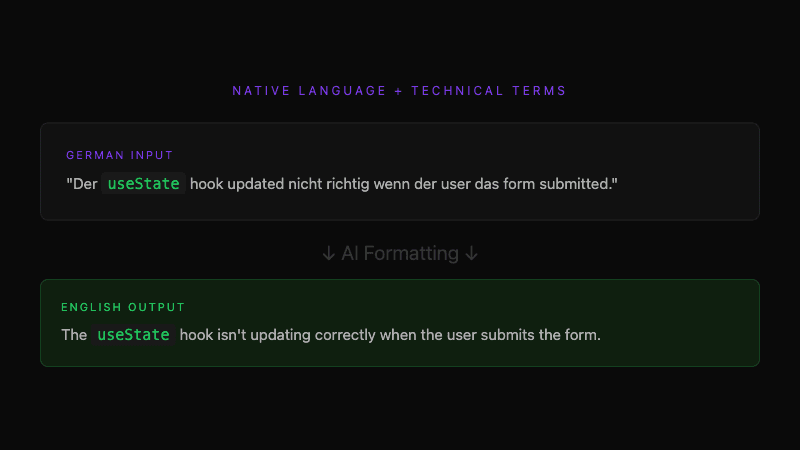 Native language expression with English code terminology
What tools support multilingual developer input?
Whispercode
Whispercode supports 8 languages with developer dictionary integration:
- English, German, Spanish, French
- Portuguese, Japanese, Chinese, Hungarian
Technical terms recognized across all supported languages. AI formatting produces English-structured output.
OpenAI Whisper (API)
Direct Whisper API access supports 99 languages. Technical term handling depends on your post-processing. Best for developers who want to build custom pipelines.
macOS Dictation
Apple's built-in dictation supports 50+ languages. Lacks developer vocabulary—useState becomes "use state" in any language. Works for casual use but not technical prompts.
Google Cloud Speech-to-Text
Extensive language support with customizable vocabularies. Requires cloud setup and API integration. Powerful but higher technical barrier.
How do you get started with multilingual voice coding?
Step 1: Verify language support
Check your tool's documentation for your language. Look specifically for:
- Transcription accuracy for your language
- Technical term handling in bilingual speech
- AI formatting support
Step 2: Configure language settings
Most tools have language preferences:
- Primary language for general transcription
- Technical dictionary overlay for code terms
- Auto-detection vs manual selection
Step 3: Start with simple prompts
Begin with straightforward requests in your language:
"[Your language: Explain what this function does]"
Verify transcription accuracy and technical term handling before relying on complex prompts.
Step 4: Develop your mixed-language pattern
Find the code-switching style that works for you:
- How much native language vs English?
- When do you switch?
- What technical terms need clearer enunciation?
This pattern becomes automatic with practice.
Frequently asked questions
Can I use voice input in my native language for coding?
Yes. Modern voice-to-text tools support multiple languages with technical term recognition. You can explain problems in German, Spanish, Japanese, or other supported languages while terms like useState and GraphQL remain correctly formatted in English.
How do technical terms work in multilingual voice input?
Developer-focused tools with specialized dictionaries recognize English technical terms regardless of surrounding language. When you say "Der useState hook" in German, the output preserves "useState" while transcribing the German context normally.
Which languages support developer voice input best?
English has the strongest support. German, Spanish, French, and Portuguese have excellent coverage. Japanese and Chinese are well-supported and improving. Other languages vary by tool—check specific documentation for current status.
Does AI formatting work with non-English input?
Yes. AI formatting can process Spanish, German, or other language input and produce structured English output suitable for Claude or ChatGPT. The AI understands the context regardless of input language and formats appropriately.
Should I speak in English or my native language for AI prompts?
Use whatever captures your thinking most precisely. Complex explanations often work better in your native language. Code references naturally stay in English. Many developers code-switch within a single prompt—this is natural and tools accommodate it.
Further reading
- Voice commands for developers
- AI enhancement and prompt formatting
- IDE integration with VSCode and Cursor
Ready to code in your native language? Try Whispercode — 8 languages with technical terminology recognition for international developers.
Last updated: January 2026

Building Whispercode — voice-to-code for developers. Helping teams ship faster with AI automation, workflow optimization, and voice-first development tools.
Last updated: February 15, 2026