
From idea to implementation: The voice-driven development workflow
Complete guide to voice-driven development workflow. From capturing ideas to implementing features, learn how to optimize every step with voice input.
TL;DR
Voice-driven development captures ideas at speaking speed, transforms them into structured prompts, and maintains flow through implementation. The workflow: capture ideas immediately, convert to tasks, prompt AI for implementation, document decisions—all without leaving your IDE. Each stage uses voice to eliminate typing friction and preserve context.
Key takeaways
- Ideas have a half-life — Insights evaporate within minutes if not captured; voice input captures thoughts 3x faster than typing
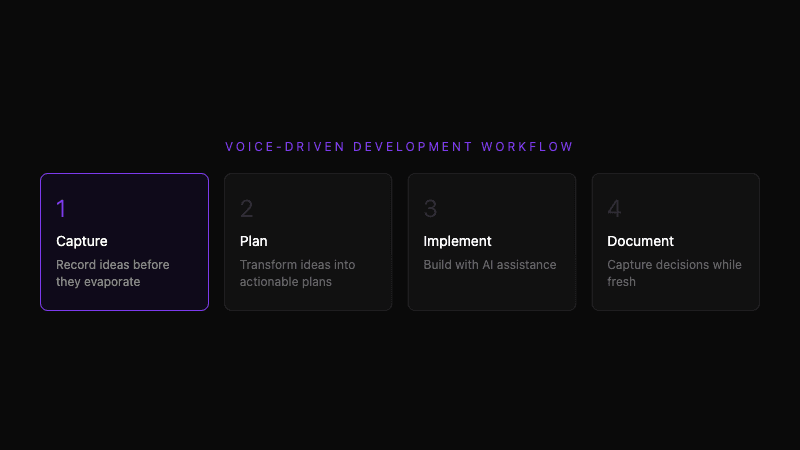
- The workflow has four stages — Capture → Plan → Implement → Document, each optimized for voice input
- Context transfer is the key challenge — Moving from idea to implementation loses information; voice preserves the "why" behind decisions
- AI transforms each stage — Spoken ideas become structured plans, plans become implementation prompts, implementations become documentation
- IDE integration connects everything — Voice input that understands your current file, selection, and cursor position produces contextually-appropriate output
- The compound effect matters — Slightly better capture, planning, and documentation at each project multiplies productivity over time
 Complete workflow from capturing ideas to shipping features
Why does the idea-to-implementation gap exist?
The typical workflow breaks
Most development workflows have a pattern:
- Idea emerges — In a meeting, while debugging, in the shower
- Time passes — You're busy, context shifts, meetings happen
- Attempt to implement — "What was my idea again?"
- Reconstruct from memory — Degraded, incomplete, missing nuance
- Build something — Often not what you originally envisioned
The gap between idea and implementation loses information at every stage. By the time you write code, you're implementing a shadow of the original insight.
Why this matters
The insight you had during debugging—"we should cache this response because it's called 47 times per page load"—contains:
- The observation (called 47 times)
- The context (during page load)
- The solution (cache it)
- The confidence (definitely worth doing)
By the time you implement, you might remember "cache something" but not why it mattered or what the specific optimization was.
Voice input compresses the gap
Voice captures ideas at speaking speed (150 WPM) instead of typing speed (40-60 WPM). More importantly, speaking is natural—you capture the full context because that's how you naturally explain things.
The idea emerges → you speak it → it's captured. Gap eliminated.
What is the voice-driven development workflow?
Stage 1: Capture
Goal: Record ideas before they evaporate
Trigger: Any insight, question, or idea worth remembering
Action: Press hotkey → speak → continue with previous task
Example capture:
"Note: The payment retry logic doesn't respect the exponential backoff config. It's retrying immediately instead of waiting. Check the calculateDelay function—I think the milliseconds-to-seconds conversion is wrong."
This 15-second capture preserves the insight, the specific location, and the hypothesis. Without capture, you'd have to re-discover this next time you look at the code.
Tools:
- Whispercode Note Mode for structured notes
- Global hotkey that works from any application
- Mobile capture for ideas away from computer
Stage 2: Plan
Goal: Transform captured ideas into actionable plans
Trigger: Beginning work on a captured idea
Action: Review capture → expand with voice → generate task breakdown
The captured note becomes a planning prompt:
"I want to fix the payment retry timing issue. Looking at my previous note, the problem is in calculateDelay where we convert between milliseconds and seconds. I need to: first, write a test that verifies the delay calculation; second, fix the conversion; third, verify against the config values; fourth, test the full retry flow end-to-end."
AI formats this into:
## Task: Fix Payment Retry Timing

### Context
Payment retry logic not respecting exponential backoff config.
Retrying immediately instead of waiting.
Issue location: `calculateDelay` function.
Root cause hypothesis: milliseconds-to-seconds conversion error.

### Implementation Plan
1. [ ] Write test for delay calculation
2. [ ] Fix ms/s conversion in calculateDelay
3. [ ] Verify against exponential backoff config
4. [ ] End-to-end retry flow test
The spoken planning session produces structured tasks ready for implementation.
Tools:
- Voice prompting with AI enhancement
- IDE integration for code context
- Task management system for tracking
 Transforming captured ideas into actionable implementation plans
Stage 3: Implement
Goal: Build the feature using AI-assisted development
Trigger: Starting work on a planned task
Action: Prompt AI with context → review generated code → iterate
Implementation prompts work best with full context:
"I'm in the calculateDelay function. It takes retryCount and config, and should return milliseconds to wait before the next retry. Currently it multiplies the base delay by 2^retryCount, but I think it's treating the baseDelay config value as seconds when it's actually milliseconds. Can you review and suggest the fix?"
With code context, the AI sees:
- The current file
- The selected function
- Surrounding code
- Your hypothesis
The response is specific and actionable, not generic.
Iteration pattern:
- Initial prompt with context
- Review AI response
- Speak refinements: "That's close but also handle the case where retryCount is 0"
- Repeat until complete
Tools:
- Voice prompting with automatic IDE context
- Cursor/VSCode with AI integration
- Test runner for verification
Stage 4: Document
Goal: Capture decisions and learnings for future reference
Trigger: Completing implementation, encountering interesting patterns, making tradeoff decisions
Action: Speak documentation while context is fresh
Post-implementation documentation:
"Documentation note: The payment retry calculateDelay function was converting baseDelay incorrectly. The config stores baseDelay in milliseconds, but the function treated it as seconds and multiplied by 1000 again. Fixed by removing the duplicate conversion. Also added a comment explaining that all timing values in this config are in milliseconds for consistency."
AI formats into:
## Payment Retry Timing Fix

### Problem
`calculateDelay` function applied incorrect conversion:
- Config stores `baseDelay` in milliseconds
- Function treated as seconds, multiplied by 1000
- Result: delays 1000x longer than intended

### Solution
Removed duplicate ms conversion. All timing config values are now consistently in milliseconds.

### Notes
Added inline comment explaining the milliseconds convention for future developers.
This documentation captures the why while it's fresh. Six months later, when someone wonders about the code, the reasoning exists.
Tools:
- Voice documentation with AI formatting
- Knowledge base integration (Notion, Obsidian, wiki)
- PR description generation
How do you connect the stages?
Context threading
Each stage should reference the previous:
- Capture creates the initial note
- Plan references the capture: "Based on my note about..."
- Implement references the plan: "Working on task 2 from my plan..."
- Document references the implementation: "Completed the fix for..."
This threading maintains context across stages. The AI understands the history and produces contextually-appropriate output.
Time gaps don't break flow
The workflow handles interruptions:
- Capture a morning idea
- Plan it after lunch
- Implement over two days
- Document when complete
Because each stage produces artifacts (notes, plans, code, docs), you can resume without reconstructing context from memory.
Feedback loops improve the system
The documented solution informs future captures:
"Seeing similar timing issues in the notification service—check for the same milliseconds conversion problem we fixed in payment."
Past documentation makes future capture more precise.
What does a complete cycle look like?
Monday 9:00 AM — Capture
During standup, you mention the performance issue you noticed Friday.
After standup:
"Note: Dashboard loading slowly. Network tab shows 47 requests to /api/user-preferences on page load. Something's calling it in a loop. Check the useEffect dependencies in PreferencesProvider."
30 seconds. Insight preserved.
Monday 11:30 AM — Plan
You have a 30-minute slot before lunch. Pull up the note:
"Planning the dashboard performance fix. The note says 47 duplicate requests to user-preferences, probably a useEffect loop. I need to: one, add request logging to confirm the call pattern; two, find the useEffect triggering the loop; three, fix the dependency array or add caching; four, verify request count drops to 1. Let's also add a test that fails if we regress."
AI produces structured plan with checkboxes.
Monday 2:00 PM — Implement
Back from lunch, start on task 1:
"I'm in PreferencesProvider. Can you add console logging that tracks how many times fetchPreferences is called and what triggers each call? Include the dependency array values at each call."
AI generates logging code. You run, confirm 47 calls.
"The logs show the dependency array includes the user object, which gets recreated on every render. Can you show me how to memoize this or use a stable reference?"
Iterate until fixed. Verify request count drops to 1.
Monday 4:30 PM — Document
Before context switches:
"Documenting the dashboard performance fix. Root cause was useEffect in PreferencesProvider depending on user object which recreated every render. Fixed by extracting userId as stable primitive dependency instead of full user object. Reduced page load requests from 47 to 1. Also added a test that asserts max 2 preference fetches per session—one initial, one on user change."
AI formats into PR description and knowledge base entry.
Total voice time: ~5 minutes
The actual voice input across the day totaled perhaps 5 minutes. The output: captured insight, structured plan, implemented fix, documented solution—plus tests.
How do you build this workflow?
Start with capture
Capture is the foundation. Without it, the other stages have nothing to work with.
Week 1: Every time you have a coding insight, capture it by voice. Don't worry about the other stages yet. Build the capture habit.
Add planning
Once capture is automatic, add planning.
Week 2: Before starting implementation, pull up relevant notes and speak a brief plan. Let AI structure it.
Connect implementation
With captures and plans in place, voice-enhanced implementation follows naturally.
Week 3: Use voice prompts for AI-assisted implementation. Include context from your plans.
Complete with documentation
Finally, close the loop with documentation.
Week 4: After completing features, speak documentation while context is fresh.
Iterate and optimize
The workflow adapts to your patterns. Notice where friction exists and adjust:
- Too many captures to process? Be more selective about what's worth capturing.
- Plans too vague? Include more specifics when planning.
- Documentation too brief? Speak more about the "why" behind decisions.
What results can you expect?
Immediate benefits
- Fewer lost insights (capture preserves ideas)
- Clearer implementation direction (plans provide structure)
- Better AI responses (voice prompts include more context)
- Documentation that actually exists
Long-term benefits
- Searchable knowledge base of decisions
- Faster onboarding for new team members
- Reduced debugging time (past context available)
- Better estimation (historical data on similar work)
Compound effects
Each complete cycle improves:
- Your capture instincts (knowing what's worth noting)
- Your planning precision (better task breakdowns)
- Your prompt quality (clearer AI communication)
- Your documentation habits (automatic, not afterthought)
Over months, these improvements multiply. The developer with strong idea-to-implementation workflow delivers more features with better quality and documentation.
Frequently asked questions
What is voice-driven development?
Voice-driven development uses voice input throughout the software development workflow: capturing ideas, planning implementation, prompting AI for code, and documenting decisions. Each stage uses voice to eliminate typing friction and preserve context that would otherwise be lost.
How do I start with voice-driven development?
Start with capture: every time you have a coding insight, speak it into a voice note. Build this habit before adding planning, implementation, and documentation stages. Each stage builds on the previous, so a strong capture foundation is essential.
What tools support voice-driven development?
Whispercode provides the full workflow with Note Mode for capture, AI enhancement for planning, IDE integration for implementation, and formatted output for documentation. Alternatives include combining general voice-to-text with AI assistants and knowledge management tools.
How does voice preserve context better than typing?
Speaking is 3x faster than typing (150 WPM vs 40-60 WPM) and feels natural rather than effortful. Developers speaking about code naturally include context, reasoning, and nuance that they'd skip when typing. This additional context produces better AI responses and more useful documentation.
How long does it take to build voice-driven workflow habits?
Most developers can establish capture habits within one week of consistent use. Adding planning takes another week. Implementation and documentation follow naturally once the foundation exists. Within a month, the full workflow feels natural.
Further reading
Ready to optimize your development workflow? Try Whispercode — voice-driven development from idea to implementation.
Last updated: January 2026

Building Whispercode — voice-to-code for developers. Helping teams ship faster with AI automation, workflow optimization, and voice-first development tools.
Last updated: February 19, 2026