
How to stay in flow state while coding: The voice-first approach
Learn how to maintain deep focus while coding. Discover the voice-first approach that eliminates context switching and keeps you in flow state.
TL;DR
Flow state in coding gets broken by context switches—especially when prompting AI assistants. Voice-first workflows eliminate typing friction, keeping you in the zone. Press a hotkey, speak your prompt, continue coding. No app switching, no manual context copy-paste.
Key takeaways
- Context switches cost 23 minutes on average — Research shows each interruption requires significant time to return to deep focus, even for "quick" tasks like typing a prompt
- Flow state is fragile — The mental model you build while debugging or designing evaporates quickly when attention shifts to typing, formatting, and app navigation
- Voice input preserves visual focus — Speaking while looking at code maintains the connection between your prompt and the actual problem you're solving
- IDE integration eliminates app switching — Prompts that appear directly in your editor, with automatic file context, remove the biggest flow-breaking interruptions
- The habit takes 3-5 days to build — Most developers feel natural with voice prompting within a week of consistent use
- Small gains compound — Slightly faster prompts, sent more often, with richer context add up to significantly better AI-assisted development
 Maintain deep focus by speaking prompts instead of typing
What is flow state in coding?
Flow state—also called "being in the zone"—is the mental condition where you're fully immersed in coding. Time seems to pass differently. Distractions fade. You move through complex problems with unusual clarity.
Psychologist Mihaly Csikszentmihalyi identified flow as the state of optimal experience: challenging enough to engage your full attention, but not so hard that you feel anxious.
For developers, flow often emerges during:
- Deep debugging sessions where you're tracing through call stacks
- Architecture design where you're balancing competing constraints
- Feature implementation where you're translating requirements into code
- Code review where you're understanding someone else's mental model
Flow is valuable. It's also fragile.
Why does flow state break?
The context switch problem
Every time you shift attention, your brain needs to reload context. Professor Gloria Mark at UC Irvine found that office workers take an average of 23 minutes to return to the original task after an interruption.
For developers, "interruption" includes:
- Slack messages
- Email notifications
- Someone walking up to your desk
- Switching to an AI assistant to ask a question
That last one is counterintuitive. AI assistants help you code faster—but the act of using them can break your flow.
The AI prompting paradox
You're deep in a debugging session. You've traced the bug to a specific function. You have a hypothesis about what's wrong. You need Claude's help to verify it.
Traditional workflow:
- Switch to browser (or separate app)
- Navigate to Claude
- Start typing... wait, what was my question?
- Re-focus on the problem
- Type out the context
- Copy code from IDE
- Paste into Claude
- Format for readability
- Ask your question
- Wait for response
- Switch back to IDE
- Remember where you were
By step 4, your mental model has degraded. By step 11, you've lost significant context. The 23-minute recovery clock starts.
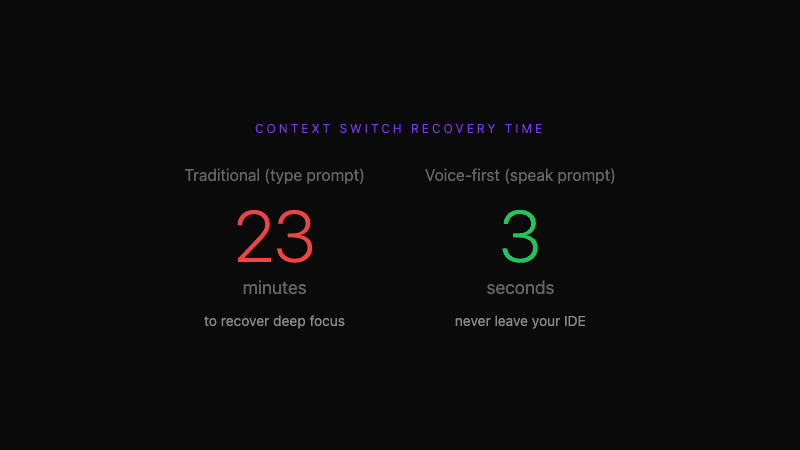 23 minutes to recover focus vs 3 seconds with voice-first approach
What is the voice-first approach?
Voice-first means speaking is the default input method for AI prompts—not typing.
The workflow becomes:
- Press
Cmd+Shift+K(without leaving your IDE) - Speak: "I think the bug is in the handleRetry function where we calculate the exponential backoff delay. The retry seems to happen immediately instead of waiting. Can you check if the delay calculation is correct?"
- Formatted prompt appears in your editor with the current file context included
- Send to AI assistant
- Continue working while waiting for response
Your eyes never leave the code. Your hands stay on the keyboard. Your mental model stays intact.
How does voice-first protect flow state?
No visual context switch
When you type a prompt, you look at the text field. You're no longer looking at the code. The visual disconnect weakens your mental model of the problem.
When you speak a prompt, you can keep looking at the code. The words come naturally because you're describing what you're literally seeing. Your brain maintains the connection between the problem and your description.
No app switching
Every application switch triggers attention reorientation. Your brain notices the new visual environment, adjusts, and then tries to maintain the original task.
IDE integration eliminates app switching entirely. The prompt interface appears inside your editor. The response appears in the same place. You never leave the coding environment.
No manual context assembly
Copying code, pasting it into prompts, formatting for readability—these are friction points that each pull attention away from the problem itself.
Automatic code context captures your current file, selected code, and cursor position. The AI assistant receives everything it needs without you manually assembling the context.
Faster input preserves memory
Short-term memory is limited. While typing a 60-word prompt (approximately 1-2 minutes), details of your mental model fade.
Speaking the same prompt takes 20-30 seconds. Less time means less memory decay. You're more likely to include the nuance that makes the AI response useful.
How do you implement voice-first coding?
Step 1: Set up the tools
You need:
- A voice-to-text tool with developer vocabulary
- An IDE extension that injects prompts
- A global hotkey that works from any context
Tools like Whispercode provide all three. The setup takes about 5 minutes:
- Download and install the desktop app
- Install the VSCode/Cursor extension
- Configure your hotkey (default:
Cmd+Shift+K) - Grant microphone access
Step 2: Create the trigger habit
Habits form through consistent triggers. Create a clear rule:
"Every time I need to ask AI a question, I press
Cmd+Shift+Kand speak instead of typing."
The specificity matters. "I'll try using voice sometimes" doesn't build habit. "Every time I need AI help" creates a clear decision point.
Step 3: Start with low-stakes prompts
Don't begin with your hardest debugging session. Start with simple requests:
- "Explain what this function does"
- "Refactor this to be more readable"
- "Add error handling to this block"
Success builds confidence. Confidence enables more complex usage.
Step 4: Accept imperfection
Your first spoken prompts won't be perfect. You might stumble, restart, or feel awkward. This is normal.
Within 3-5 days of consistent use, speaking prompts feels natural. The awkwardness fades. The speed and flow benefits become obvious.
What does voice-first look like in practice?
Debugging example
Traditional approach:
- Encounter bug
- Open browser
- Start typing prompt
- Stop to copy code
- Paste and format
- Return to prompt
- Finish typing
- Send and wait
- Return to IDE
Voice-first approach:
- Encounter bug
- Select relevant code
- Press
Cmd+Shift+K - Say: "This useState hook isn't updating after the API call returns. The loading state gets stuck at true. Can you see why the setIsLoading call might not be executing?"
- Continue investigating while waiting
Same question. Less friction. Flow preserved.
Feature implementation example
Traditional approach:
- Read requirements
- Switch to Claude
- Type: "Need help implementing..." (forget specifics)
- Check requirements again
- Continue typing
- Realize you need to reference existing code
- Copy from IDE
- Paste and explain
Voice-first approach:
- Read requirements
- Open relevant file
- Press
Cmd+Shift+K - Say: "I'm implementing a retry mechanism for failed API calls. We need exponential backoff with a max of 3 retries. The current code handles the happy path but not failures. Can you suggest where to add retry logic and how to structure it?"
- Review response with code context intact
How do you measure flow state improvement?
Qualitative signals
After a week of voice-first prompting, ask yourself:
- Do I feel less friction when asking AI questions?
- Am I prompting AI more frequently?
- Are my prompts more detailed than before?
- Do I remember my original task better after prompting?
Quantitative proxies
Track these metrics if you want data:
- Prompts per day: More prompts often indicate lower friction
- Average prompt length: Longer prompts suggest richer context
- Follow-up questions needed: Fewer follow-ups indicate better first prompts
- Time to first response: Faster prompting correlates with maintained flow
What are common objections to voice-first coding?
"I can't talk in an open office"
Valid concern. Options:
- Use a directional microphone that rejects ambient noise
- Reserve voice prompts for home/private settings
- Use headphone-mic combo that keeps audio close
Many developers in open offices use voice prompting—just more selectively than those in private spaces.
"My prompts won't be as precise"
Actually, the opposite is usually true. Typing encourages brevity because it's effortful. Speaking encourages detail because it's natural. Most developers find their spoken prompts contain more context than their typed ones.
"I'm faster at typing"
For short prompts, maybe. For prompts over 30 words, speaking is approximately 3x faster (150 WPM speaking vs 50 WPM typing). More importantly, speaking doesn't require the same cognitive overhead as typing, leaving more mental resources for the actual problem.
"Voice recognition won't understand technical terms"
General speech-to-text often fails on developer vocabulary. Developer-focused tools like Whispercode use specialized dictionaries that recognize useState, GraphQL, kubectl, and thousands of other technical terms correctly. AI enhancement further improves accuracy through context-aware processing.
What results can you expect?
First week
- Awkwardness fades
- Habit starts forming
- First "aha" moment of preserved flow
First month
- Voice becomes default for complex prompts
- Prompts consistently richer in context
- Fewer AI follow-up rounds needed
- Noticeably less context switching fatigue
Long term
- Compounding productivity gains
- Better documentation habits (capturing thoughts is easy)
- Reduced keyboard strain
- More frequent, more useful AI assistance
Frequently asked questions
What is flow state in coding?
Flow state is the mental condition of being fully immersed in coding work. Time seems to pass differently, distractions fade, and you move through complex problems with unusual clarity. It typically emerges during challenging but achievable tasks like debugging, architecture design, or feature implementation.
How does context switching affect developer productivity?
Context switching forces your brain to unload and reload mental context. Research shows each interruption costs approximately 23 minutes to fully return to the original task. For developers, this includes app switching, manual copy-paste, and typing prompts—all of which break flow state.
What is voice-first coding?
Voice-first coding means speaking is the default input method for AI prompts instead of typing. You press a hotkey, speak your prompt while looking at the code, and receive a formatted response in your IDE. This eliminates app switching and maintains visual focus on the problem.
How do I start with voice-first prompting?
Set up a voice-to-text tool with IDE integration, configure a global hotkey, and create a simple rule: "Every time I need AI help, I speak instead of type." Start with simple prompts like "explain this function" before tackling complex debugging. Most developers feel natural within 3-5 days.
Does voice-first work in open offices?
Yes, with modifications. Use a directional microphone to reduce ambient noise, reserve voice prompts for complex questions (use typing for quick one-liners), or use a close-talk headphone-mic combo. Many developers in open offices use voice prompting selectively.
Further reading
- Voice commands for developers
- IDE integration with VSCode and Cursor
- Code context and automatic prompt enrichment
Ready to protect your flow state? Try Whispercode — voice prompts that keep you in the zone.
Last updated: January 2026

Building Whispercode — voice-to-code for developers. Helping teams ship faster with AI automation, workflow optimization, and voice-first development tools.
Last updated: February 3, 2026