
Developer note-taking: From voice memos to structured documentation
Transform scattered voice memos into structured developer documentation. Learn the AI-powered workflow for capturing and organizing technical ideas.
TL;DR
Voice note-taking captures developer ideas 3x faster than typing, and AI transforms rambling thoughts into structured documentation. The workflow: speak your thoughts, let AI format them, organize into your system. This preserves context that evaporates when you wait to write things down.
Key takeaways
- Ideas evaporate without capture — The insight you have during debugging rarely survives until you "have time to document it"
- Voice captures thought at speaking speed — 150 WPM speaking vs 40-60 WPM typing means faster capture with more detail preserved
- AI transforms rambling into structure — Spoken stream-of-consciousness becomes organized sections with headers, code blocks, and action items
- Context is the irreplaceable element — Why you made a decision matters more than what you decided; voice captures the reasoning naturally
- Note-to-task pipelines connect thinking to doing — Captured ideas become actionable tasks without re-reading and re-processing
- Developer-specific tools recognize terminology — Technical vocabulary like
useState,kubectl, andGraphQLneeds specialized recognition
 Transform voice memos into structured technical documentation
Why do developers struggle with note-taking?
The capture gap
You're deep in debugging. You finally understand why the payment service keeps timing out—the connection pool is exhausted because retries don't release connections properly. This insight took an hour to reach.
Then: Slack ping. Meeting in 5. Context switch.
When you return, the insight is fuzzy. You remember what was wrong but not why you concluded that. The reasoning that took an hour to build is gone.
This happens constantly. The most valuable knowledge—hard-won understanding—evaporates before documentation.
The effort barrier
Even when time permits, documentation feels like overhead. You already solved the problem. Writing about it is extra work with no immediate payoff.
So notes become terse:
"Fixed payment timeout - connection pool issue"
This captures the what but loses the why and how. Six months later, when the problem returns, you'll debug it again.
The formatting tax
Developer documentation has structure:
- Code blocks with proper syntax
- Headers for organization
- Links to related files/resources
- Action items for follow-up
Creating this structure while capturing ideas splits your attention. The effort of formatting competes with the content you're trying to capture.
How does voice note-taking solve these problems?
Speed eliminates the capture gap
Voice input is approximately 3x faster than typing. When an insight strikes, capture it before context-switching:
Press hotkey → "The payment timeout is caused by connection pool exhaustion. Retries don't release connections, so under load we hit the pool limit. Need to add connection.release() in the retry catch block. Also consider reducing pool size from 20 to 10 to surface this issue earlier in testing." → Continue with other task.
Total time: 15 seconds. The reasoning is preserved.
Natural speech captures context
When typing, developers minimize. Each keystroke is effort, so notes become terse.
When speaking, explanation flows naturally. You describe not just what happened but why it matters, what you tried, what alternatives you considered.
This context is the irreplaceable part. What you decided can often be inferred from code. Why you decided it cannot.
AI formatting handles structure
Modern voice-to-text tools with AI enhancement transform spoken input into formatted output:
You say:
"Note about the auth refactor. The current implementation uses a custom JWT library because when we started, jose didn't support Ed25519. It does now as of version 4.11. We should migrate to jose because it's better maintained and has built-in security fixes. The migration is maybe 2-3 hours but needs to coordinate with the mobile team since they verify tokens too. Add this to the next sprint planning."
AI formats:
## Auth Refactor: JWT Library Migration

### Current State
Using custom JWT library. Reason: `jose` didn't support Ed25519 when we started.

### Proposed Change
Migrate to `jose` library:
- Now supports Ed25519 (as of v4.11)
- Better maintained
- Built-in security fixes

### Estimate
2-3 hours implementation

### Dependencies
- Coordinate with mobile team (they verify tokens)

### Action Items
- [ ] Add to next sprint planning
The spoken ramble becomes structured documentation without manual formatting.
What's the ideal developer note-taking workflow?
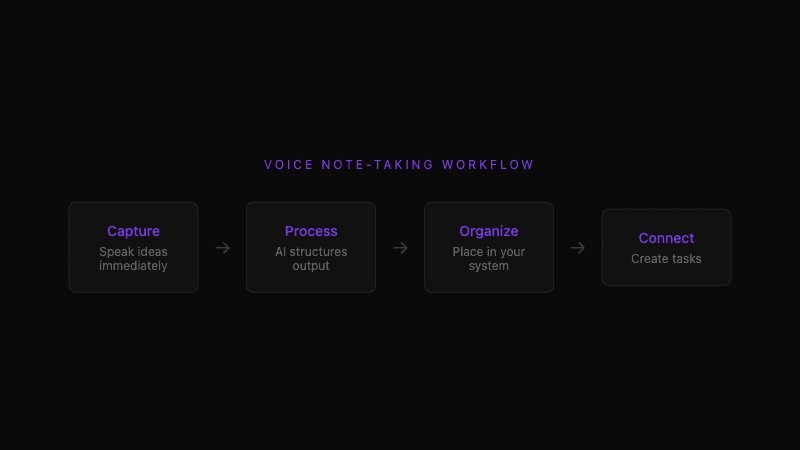
Capture: Speak immediately
When understanding crystallizes, capture it:
- Press global hotkey (
Cmd+Shift+Nin Whispercode) - Speak your thoughts while looking at the code
- Include context: what you're working on, what you discovered, why it matters
Don't wait for a "good time" to document. The good time is now, while context is fresh.
Process: AI structures your input
AI-powered tools transform raw speech into organized notes:
- Sections: Headers based on topic shifts in your speech
- Code blocks: Technical terms wrapped appropriately
- Lists: Enumerated points extracted from spoken sequences
- Action items: Tasks identified from phrases like "need to" or "should"
Review the formatted output. Minor adjustments may help, but the heavy lifting is done.
Organize: Place in your system
Notes need homes. Common approaches:
Project-linked notes:
Store notes with the code they reference. docs/notes/2026-02-payment-timeout.md alongside the payment service.
Knowledge base: Obsidian, Notion, or wiki for searchable long-term reference. Tag for discoverability.
Issue tracker: If the note includes action items, create tickets directly or link to existing issues.
Connect: Note-to-task pipelines
The most valuable notes have actionable outcomes. Voice-captured insights should flow into your task system:
"This needs a task for the auth migration and a separate one for mobile coordination"
Tools like Whispercode support note-to-task conversion, transforming documentation into queued work.
 From voice capture to organized documentation and actionable tasks
What should developers document with voice?
Architecture decisions
"We're using Redis for session storage instead of JWTs for this service because we need to revoke sessions immediately when users change passwords. JWT expiration isn't fast enough for our security requirements. The tradeoff is we need Redis highly available, but we already have that for the rate limiter."
This captures the decision, alternatives considered, and reasoning. Invaluable when someone later asks "why don't we just use JWTs?"
Bug investigation findings
"The intermittent 502 errors correlate with garbage collection pauses. The logs show GC runs taking 200-300ms during peak load. The heap is configured for 2GB but actual usage peaks at 4GB, causing constant major GC. Increasing heap to 6GB should help, but we should also investigate memory allocation patterns in the image processor."
Even if you can't fix it now, this context accelerates future debugging.
Code review notes
"Looking at the auth PR. The implementation is clean but I'm concerned about the race condition on line 47. If two requests hit simultaneously with the same token, both might pass validation before either writes the used flag. Suggesting a database lock or Redis atomic operation."
Structured feedback captured while reviewing, before context shifts.
Onboarding context
"The data pipeline has three stages that aren't obvious from the code. Stage one pulls from external APIs and caches raw data. Stage two normalizes and deduplicates. Stage three aggregates for the dashboard. If any stage fails, check the dead letter queue—that's where errors land."
This tribal knowledge helps new team members. It's rarely written down because it feels "obvious" to those who know it.
Technical debt notes
"This caching layer needs attention. It was written for our old data model and now has special cases for the new format. Should refactor to handle both generically, probably saving 200 lines and eliminating the format-sniffing code. Not urgent but creates friction for anyone touching this module."
Capture the pain point with context. When prioritization time comes, you'll have the details.
What tools support developer voice note-taking?
Whispercode
Whispercode is built specifically for developer voice input:
- Developer dictionary: Technical terms recognized correctly
- AI formatting: Spoken input becomes structured documentation
- IDE integration: Notes appear in your editor with code context
- Note-to-task: Convert documentation into actionable items
Best for: Developers who want notes integrated with their coding workflow.
Obsidian + voice input
Obsidian's local-first approach pairs with voice tools:
- Use any voice-to-text for capture
- Obsidian handles organization and linking
- Plugins extend functionality
Best for: Developers with existing Obsidian systems who want to add voice capture.
Apple Notes + Dictation
Free, simple, always available:
- macOS Dictation captures raw text
- Apple Notes syncs across devices
- No developer-specific features
Best for: Occasional notes where technical accuracy isn't critical.
Notion + Notion AI
Notion handles both capture and AI processing:
- Voice input through mobile app
- Notion AI reformats content
- Team sharing built in
Best for: Teams already using Notion who want to add voice capture.
How do you build a voice note-taking habit?
Start with one trigger
Don't try to capture everything. Pick one situation:
"Every time I solve a bug that took more than 30 minutes, I voice-note the solution."
Consistency on one trigger builds the habit faster than sporadic use across many situations.
Lower the activation barrier
The easier capture is, the more you'll do it:
- Global hotkey that works from any application
- Mobile app for capturing outside the IDE
- No required fields or categorization during capture
Organize later. Capture now.
Review weekly
Unprocessed notes lose value. Weekly review:
- Skim captured notes
- File into appropriate systems
- Create tasks from action items
- Delete or archive irrelevant captures
This review also reinforces learning—revisiting recent insights solidifies understanding.
Share useful notes
Notes that help others have more impact than private documentation. When you capture something valuable:
- Post in team Slack channel
- Add to shared knowledge base
- Reference in PR descriptions or comments
Shared notes benefit the team and establish your expertise.
What results can developers expect?
Immediate benefits
- Ideas captured before they evaporate
- More detail preserved per note (speaking captures more than typing)
- Reduced friction between insight and documentation
Long-term benefits
- Searchable knowledge base accumulates over time
- Future debugging accelerates with past context
- Team knowledge grows through shared notes
- Decision history becomes auditable
Compounding value
Each note is individually small. The collection becomes significant:
- 5 notes per week × 50 weeks = 250 notes per year
- Searchable repository of decisions, findings, and context
- Historical record of learning and problem-solving
Frequently asked questions
Why should developers use voice for note-taking?
Voice input captures ideas at speaking speed (150 WPM vs 40-60 WPM typing), preserving context before it evaporates. AI formatting transforms rambling into structured documentation. The combination eliminates the capture gap and formatting tax that make traditional note-taking feel like overhead.
What should developers document with voice notes?
Architecture decisions (the why, not just the what), bug investigation findings, code review feedback, onboarding context, and technical debt observations. Anything where the reasoning matters more than the conclusion benefits from voice capture's natural explanation style.
How do AI tools format voice notes for developers?
AI-powered tools analyze spoken input and generate structured output: headers based on topic shifts, code blocks around technical terms, bullet lists from enumerated points, and action items from phrases like "need to" or "should do." The result is organized documentation without manual formatting.
What tools support developer voice note-taking?
Whispercode offers developer-specific vocabulary and IDE integration. Obsidian pairs with any voice input for local-first knowledge management. Notion handles both capture and AI processing for teams. macOS Dictation works for simple notes without technical terminology requirements.
How do I build a voice note-taking habit?
Start with one trigger: "Every time I solve a hard bug, I voice-note the solution." Use tools with global hotkeys for low friction capture. Review weekly to file notes into systems and create tasks from action items. Share useful notes with your team to reinforce the habit.
Further reading
- Voice commands for developers
- AI enhancement and note formatting
- Code context for richer documentation
Ready to capture your developer insights? Try Whispercode — voice notes that transform into structured documentation with full code context.
Last updated: January 2026

Building Whispercode — voice-to-code for developers. Helping teams ship faster with AI automation, workflow optimization, and voice-first development tools.
Last updated: February 11, 2026