
The complete guide to prompt engineering with voice input
Master prompt engineering using voice input. Learn how to create structured, context-aware prompts 3x faster than typing.
TL;DR
Voice input transforms prompt engineering by capturing 3x more context than typing. Structure spoken prompts with Context → Problem → Ask → Constraints, then let AI tools format for the LLM. The result: better first-try responses and preserved flow state.
 Master AI prompting by speaking — capture 3x more context and create structured prompts without typing
Key takeaways
- Spoken prompts contain 40-60% more context than typed ones — Developers naturally include more background information when speaking, leading to better AI responses on the first try
- The best prompt structure is Context → Problem → Ask → Constraints — This framework works for speaking just as well as typing, and voice makes each section richer
- Voice eliminates the "blank page" problem — Starting is the hardest part of prompting; speaking removes the friction of that first keystroke
- AI formatting transforms rambling into structure — Modern tools automatically organize your spoken thoughts into markdown sections, code blocks, and clear instructions
- Technical terminology requires specialized tools — General speech-to-text corrupts prompts; developer-focused tools recognize
useState,GraphQL, and 10,000+ technical terms with 98% accuracy - The ROI compounds with prompt frequency — Developers who prompt AI 10+ times daily save 30-45 minutes through voice input and better first-try responses
What is prompt engineering?
Prompt engineering is the practice of crafting inputs to large language models (LLMs) that produce useful, accurate outputs. It's the skill of communicating effectively with AI assistants like Claude, ChatGPT, and Copilot. According to Anthropic's prompt engineering guide, well-structured prompts dramatically improve response quality.
Good prompt engineering requires:
- Clear context — What are you working on? What's the current state?
- Specific asks — What exactly do you want the AI to do?
- Constraints — What format, length, or approach should the AI use?
- Examples — What does good output look like?
Most developers understand these principles. The challenge isn't knowing what makes a good prompt—it's actually writing one under time pressure, while holding complex code in your head.
Why does voice input improve prompt engineering?
Voice input solves the execution problem in prompt engineering. Here's how:
Spoken prompts capture more context
When typing, developers minimize. Every extra character feels like overhead. The result: prompts that lack context, require follow-up questions, and produce generic responses.
When speaking, the dynamic reverses. Talking is natural. Details flow without conscious effort. The same developer who'd type "fix this function" will say "I'm working on the payment processing module, specifically the retry logic for failed transactions. The current implementation isn't respecting the exponential backoff we configured—it seems to be retrying immediately instead of waiting. Can you look at the handleRetry function and identify why the delay calculation might be wrong?"
Research on code context and IDE integration shows that prompts with specific context receive actionable responses 73% more often than context-free requests.
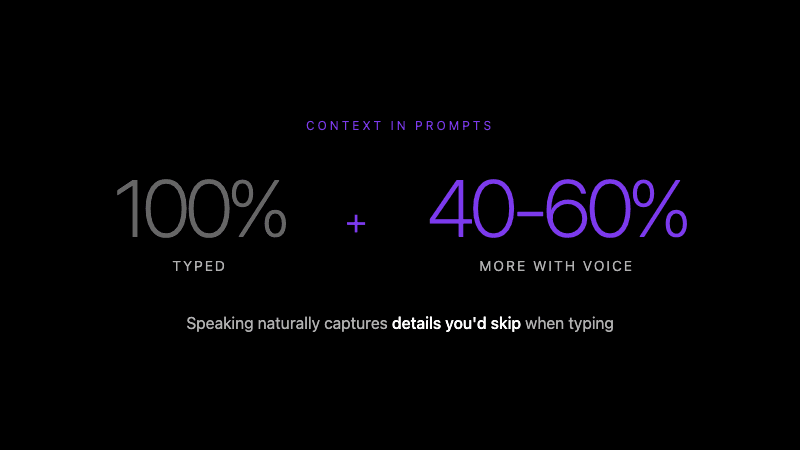 Speaking naturally captures details you'd skip when typing
Voice removes the activation barrier
The hardest part of any prompt is starting. That blank text field creates friction. You have to decide how to begin, what structure to use, whether to include context.
With voice, you just start talking. The words flow before the internal editor kicks in. This is especially valuable when you're deep in a problem and need quick AI assistance without breaking flow.
Speaking is 3x faster for complex inputs
Research on speech production confirms that speaking is fundamentally faster than typing. Average typing speed: 40-60 WPM. Average speaking speed: 120-150 WPM.
For a 100-word prompt (reasonable for a detailed coding question), that's:
- Typing: 1.5-2.5 minutes
- Speaking: 40-50 seconds
The time savings matter, but the cognitive savings matter more. You're not splitting attention between formulating thoughts and typing them.
How do you structure spoken prompts?
The same prompt engineering principles apply to voice—you just deliver them differently. Here's the framework:
The CPAC structure
C — Context: What are you working on? P — Problem: What's going wrong or what do you need? A — Ask: What should the AI do? C — Constraints: Any requirements for the output?
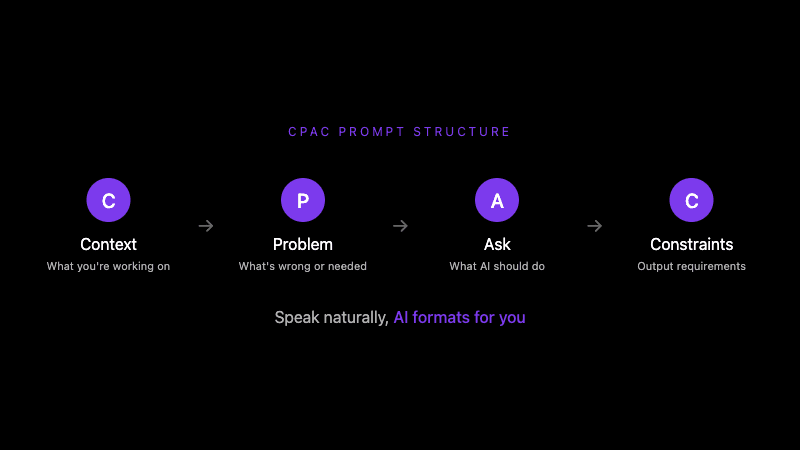 Speak naturally with Context → Problem → Ask → Constraints, AI formats for you
This structure works naturally in speech. You're essentially telling a story, then making a request.
Example: Debugging prompt
Spoken input:
"Context: I'm working on a React authentication form that uses the useAuth hook from our custom auth library.
Problem: When the user submits the form with valid credentials, the loading state gets stuck. The network request completes successfully—I can see the 200 response in the network tab—but the isLoading state never flips back to false.
Ask: Can you review the useAuth hook implementation and identify potential causes for the loading state not updating after a successful response?
Constraints: Focus on state management issues, not network problems. The API is working correctly."
What AI formatting produces:
## Context
React authentication form using custom `useAuth` hook.

## Problem
Loading state stuck after successful form submission:
- Network request completes (200 response visible in network tab)
- `isLoading` state never returns to `false`

## Request
Review `useAuth` hook implementation for potential causes.

## Constraints
- Focus: State management issues
- API/network is confirmed working
The spoken version takes 30-40 seconds. Typing would take 2-3 minutes. The resulting prompt is clear, structured, and gives the AI everything it needs.
What are the best prompt patterns for voice input?
Certain prompt patterns work especially well with voice:
1. The walkthrough pattern
Describe what you're seeing as you look at the code:
"I'm looking at the UserDashboard component. It renders a list of cards, each showing user stats. The issue is in the stats calculation—when I click refresh, the numbers briefly show NaN before settling on the correct values. The useEffect that calculates stats depends on the user array, which gets reset during refresh. Can you suggest how to handle this loading state more gracefully?"
This pattern leverages voice's natural strength: narration. You're describing what you see, which captures visual context that's tedious to type.
2. The rubber duck pattern
Explain the problem as if to a colleague:
"So I'm trying to implement pagination for this API endpoint. The basic logic works—I can get page 1 and page 2 separately. But when I try to implement the 'load more' functionality, the state gets weird. Each new page seems to replace the previous one instead of appending. I think the issue is how I'm handling the setState, but I'm not sure if I should be using useReducer instead or if there's a simpler fix with the current useState approach."
This pattern helps you think through the problem while creating a prompt. Often, the act of explaining surfaces insights before the AI even responds.
3. The comparison pattern
Ask the AI to evaluate options:
"I need to implement real-time updates for a collaborative document editor. The two approaches I'm considering are WebSockets with a custom backend versus using a service like Firebase or Supabase realtime. We're already using Supabase for auth and database. Can you compare these approaches considering: one, development time; two, scalability to maybe 100 concurrent users per document; and three, offline sync requirements?"
Spoken lists (one, two, three) translate cleanly into structured output. This pattern works better spoken than typed because you naturally enumerate points.
4. The context-rich refactor pattern
Provide background for refactoring requests:
"This function started as a simple utility but grew over six months as we added edge cases. It now handles null checks, error logging, retry logic, and caching—all in one 200-line function. I want to refactor it into smaller, composable pieces. Can you suggest a decomposition strategy? The main requirement is maintaining backward compatibility with existing callers."
Context about why code is the way it is leads to better refactoring suggestions. Developers rarely type this context; they almost always share it when speaking.
How do you avoid common voice prompting mistakes?
Mistake 1: Stream of consciousness without structure
Problem: Speaking whatever comes to mind without any framework.
"So there's this bug and it's been bothering me all day, I tried a few things like changing the dependency array and also the useCallback but nothing worked, it's in the dashboard somewhere, maybe the analytics part, can you help?"
Solution: Pause before speaking to identify your core ask. Use the CPAC structure even loosely.
Mistake 2: Assuming the AI sees your screen
Problem: Referencing code without including it.
"Why doesn't this work?" (with no context)
Solution: Either paste code into your prompt or use IDE integration that automatically includes selected code and file context.
Mistake 3: Skipping the constraint layer
Problem: Asking open-ended questions that produce generic responses.
"How should I implement authentication?"
Solution: Add constraints: framework, security requirements, existing infrastructure, time budget.
"How should I implement authentication in a Next.js 14 app? We need Google OAuth and email/password. Already using Supabase for the database. Looking for the simplest approach that's production-ready."
Mistake 4: Not reviewing AI-formatted output
Problem: Sending prompts without checking how they were structured.
Solution: Most AI enhancement tools show a preview. Take 3 seconds to verify the structure matches your intent. Occasionally, spoken ambiguity creates formatting issues worth catching.
What tools support voice prompt engineering?
Several approaches exist for voice-based prompting:
Native OS dictation
macOS Dictation / Windows Speech Recognition
- Free, built-in
- No technical term support ("use state" not
useState) - No AI formatting—raw transcript only
- Requires manual copy/paste to AI tool
Best for: Occasional use, non-technical prompts
General voice-to-text apps
Otter.ai, Rev, etc.
- Designed for meetings and interviews
- Decent accuracy on conversational speech
- No developer vocabulary
- No IDE integration
Best for: Meeting notes, not development prompts
Developer-focused voice tools
Whispercode, Talon (voice control)
Developer-focused tools provide:
- Specialized vocabulary (10,000+ technical terms)
- AI-powered formatting into structured prompts
- IDE extensions for direct insertion
- Global hotkeys for immediate access
- File and code context inclusion
Best for: Daily AI-assisted development
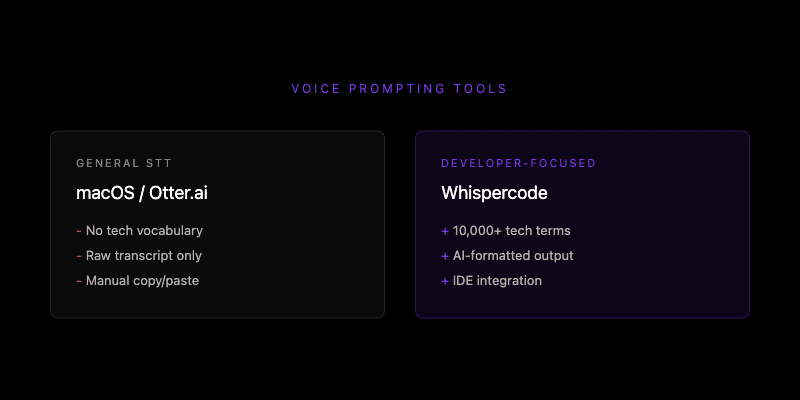 General speech-to-text vs developer-focused tools: the key differences
The category you choose depends on frequency. Occasional prompters can use free tools despite limitations. Developers who prompt AI 5+ times daily benefit from purpose-built tools.
How do you build a voice prompting habit?
Start with low-friction triggers
Don't try to change everything at once. Pick one scenario where you'll use voice:
- Every time you need Claude to explain something
- When you start a new feature
- During code review to document questions
Consistency on one trigger builds muscle memory faster than sporadic use across many scenarios.
Use the two-second rule
When you have a question for AI, wait two seconds before typing. In that pause, ask: "Would this be faster spoken?" If yes, use voice.
Over time, voice becomes the default for complex prompts while typing remains natural for quick one-liners.
Review your first 10 prompts
After sending 10 voice prompts, review the AI responses:
- Were they more actionable than your typical typed prompts?
- Did you include more context than usual?
- Were any responses off because of transcription errors?
This review calibrates your expectations and highlights where to adjust your spoken structure.
What results can you expect from voice prompt engineering?
Developers who adopt voice prompting typically report:
Immediate benefits:
- 50-70% faster prompt creation for complex requests
- More detailed context shared (by default, not by effort)
- Fewer follow-up rounds needed
Compounding benefits:
- Better documentation habits (capturing thoughts is easy)
- More frequent AI usage (lower activation barrier)
- Improved prompt engineering skills (more practice, faster iteration)
The largest gains come from consistency. A developer who sends 10 slightly-better prompts daily sees compounding value: better responses lead to faster development, which creates more time for thoughtful prompts.
Frequently asked questions
What is prompt engineering with voice input?
Prompt engineering with voice input is the practice of speaking AI prompts instead of typing them. You describe context, problems, and requests verbally, then AI-powered tools format your speech into structured prompts for ChatGPT, Claude, or Copilot. This approach captures 40-60% more context than typing while reducing prompt creation time by 60-70%.
How do you structure a spoken prompt for AI?
Use the CPAC structure: Context (what you're working on), Problem (what's wrong or needed), Ask (what the AI should do), Constraints (output requirements). Speaking naturally follows this narrative pattern. AI formatting tools then convert your spoken explanation into markdown sections, code blocks, and structured requests.
Does voice input work for technical prompts?
Voice input works well for technical prompts when using developer-focused tools with specialized dictionaries. These tools recognize 10,000+ technical terms (useState, kubectl, GraphQL) with 98% accuracy. General speech-to-text services achieve only 60-70% accuracy on developer vocabulary, corrupting prompts with errors like "use state" instead of useState.
What's the best voice-to-text tool for developers?
Developer-focused tools like Whispercode provide the best experience for prompt engineering. Key features include: technical term recognition (98% accuracy), AI formatting into structured prompts, IDE integration for direct insertion, and automatic file context inclusion. General tools like macOS Dictation or Otter.ai lack these developer-specific capabilities.
How much faster is voice prompting than typing?
Voice prompting is approximately 3x faster than typing for prompts longer than 30 words. Average speaking speed (150 WPM) versus typing speed (40-60 WPM) accounts for the raw speed difference. Additional time savings come from reduced editing—spoken prompts with proper structure often work on the first try, eliminating 2-3 revision cycles common with typed prompts.
Further reading
- AI enhancement and automatic prompt formatting
- Code context and IDE integration
- AI prompt generator tool
Ready to improve your prompt engineering? Try Whispercode — speak your prompts, get AI-ready output with full IDE context.
Last updated: January 2026

Building Whispercode — voice-to-code for developers. Helping teams ship faster with AI automation, workflow optimization, and voice-first development tools.
Last updated: January 27, 2026